
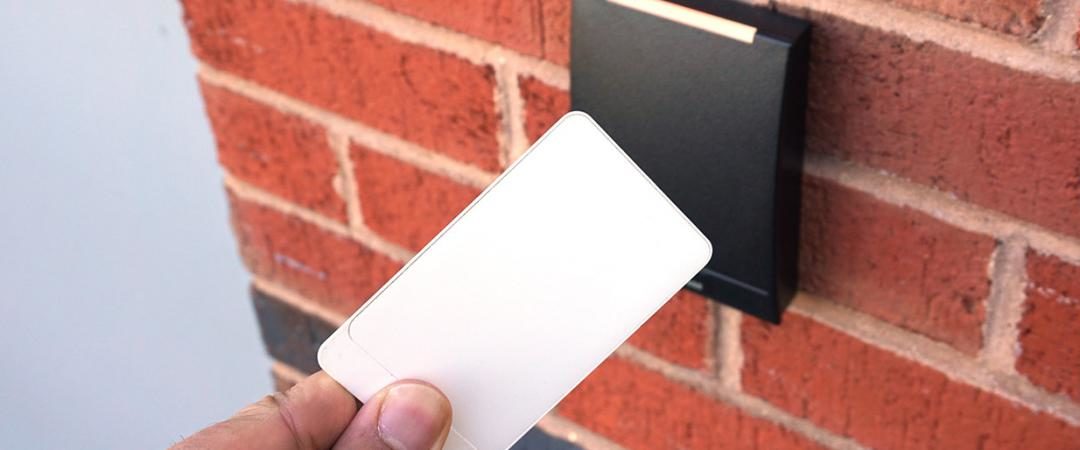
Card access systems are the most widely deployed form of electronic access control in commercial facilities — and for good reason. They replace physical keys with programmable credentials that can be issued, modified, and revoked instantly, create a complete audit trail of every access event, and integrate with cameras, alarms, and building management systems in ways that traditional locks never could.
This guide covers how card access systems work, the different card and credential types available, the advantages they provide over traditional key systems, and what to look for when selecting a system for your facility.
How Card Access Systems Work
A card access system operates on a simple principle: a credential (card, fob, or mobile device) communicates with a reader, which queries a controller to determine whether access should be granted. The process happens in milliseconds:
- The credential holder presents their card or fob to the reader
- The reader captures the credential data and sends it to the access control controller
- The controller checks the credential against its database — is this a valid credential, is this person authorized for this door, and is it an authorized time of day?
- If all conditions are met, the controller signals the door hardware (electric strike, magnetic lock, or motorized lock) to release
- The event is logged — credential ID, door, timestamp, and access granted or denied
This happens whether the system is a standalone unit at a single door or a networked enterprise system managing thousands of doors across multiple buildings. The architecture scales; the fundamental operation is the same.
Types of Card Access System Credentials
Card access systems use several different credential technologies, each with different security characteristics and appropriate use cases:
Magnetic Stripe Cards
Magnetic stripe cards store credential data on a magnetic stripe on the back of the card, similar to a credit card. The card is swiped through a reader that reads the stripe content and compares it against the access database.
Magnetic stripe is an older technology with significant limitations: stripes degrade with use and exposure to magnetic fields, cards can be cloned relatively easily, and the swipe action adds friction to high-traffic entry points. While still in use in some legacy systems, magnetic stripe has largely been replaced by proximity and smart card technologies in new commercial installations.
Proximity (Prox) Cards and Key Fobs
Proximity cards use RFID technology to communicate with readers without requiring physical contact. The card contains an embedded antenna and microchip — when brought within range of a compatible reader (typically 2–6 inches), the reader energizes the chip via radio frequency and reads the credential data.
Key fobs operate identically to proximity cards but in a compact form factor that attaches to a keychain. They’re popular for employees who prefer not to carry a card in their wallet.
Standard 125kHz proximity cards (the most common format, often called HID Prox) transmit credential data in the clear without encryption — making them vulnerable to credential cloning attacks using readily available equipment. For facilities with meaningful security requirements, 13.56MHz smart cards with encrypted communication are the appropriate choice.
Smart Cards
Smart cards use 13.56MHz technology with encrypted, mutual authentication between card and reader. Unlike standard proximity cards, smart cards don’t simply broadcast a credential number — they perform a cryptographic handshake with the reader that verifies both the card and the reader are legitimate.
This encryption makes smart card credentials significantly harder to clone than standard proximity cards. Modern smart card platforms (HID iCLASS SE, MIFARE DESFire EV3, and similar) support multiple applications on a single card and can be used for building access, computer login, and cashless payment from the same credential.
Mobile Credentials
Mobile credentials store the access control credential on a smartphone, communicated via Bluetooth Low Energy (BLE) or NFC. The user holds their phone near a compatible reader — or in hands-free configurations, simply approaches the door — and the phone authenticates in the same way a smart card would.
Mobile credentials offer several operational advantages over physical cards: they can be issued and revoked instantly without shipping a physical card, lost credentials are deactivated by revoking the mobile credential rather than hunting down a physical card, and the phone itself adds a second factor (biometric unlock or PIN) to the authentication. See our overview of commercial access control systems for more on mobile credential deployment.
Micro Tags
Micro tags are miniaturized RFID credentials — smaller than a standard key fob — designed to be embedded in wristbands, jewelry, or other compact form factors. They’re used in applications where carrying a card or fob is impractical: manufacturing environments, healthcare settings, or facilities where employees need hands-free access during physical work.
Card Access System Advantages Over Traditional Keys
The operational advantages of card access systems over traditional mechanical keys are significant enough that most new commercial installations specify electronic access control as the baseline:
Instant Revocation
When an employee leaves or a card is lost, access is revoked in seconds from the management software — no rekeying required, no locks to change, no concern about who might have copied the key. This is the single most operationally impactful advantage of card systems for facilities with any staff turnover.
Granular Permissions
Card access systems assign permissions at the individual credential level — a specific person can access specific doors at specific times. A warehouse employee has dock access during shift hours; the same card doesn’t open the server room or the executive suite. A contractor gets access to the areas required for their work, automatically expiring at the end of their contract period. This granularity is impossible with mechanical keys.
Complete Audit Trail
Every access event generates a log entry — credential ID, door location, timestamp, and whether access was granted or denied. When an inventory discrepancy or security incident occurs, access logs immediately identify who was in which area during the relevant time window. Many compliance frameworks (HIPAA, PCI DSS, SOC 2) require documented access logs — card systems generate this documentation automatically.
Remote Management
Cloud-based card access management platforms allow administrators to add credentials, modify permissions, and review access logs from any browser — without being on-site. For multi-location organizations, centralized management of access across all facilities from a single platform is a significant operational advantage.
Integration with Other Security Systems
Card access systems integrated with commercial security camera systems automatically associate access events with video footage — every door entry generates both an access log entry and a corresponding video clip. Integration with alarm systems enables forced-door alerts, door-held-open notifications, and after-hours access alerts. Integration with emergency notification systems enables lockdown commands that secure all controlled doors simultaneously.
What the Audit Trail Captures
The access log generated by a card access system typically captures:
- Date and time of credential read
- Unique credential ID and badge number
- Name of the credential holder
- Name of the door or reader being accessed
- Access granted or denied status
- Reason for denial (invalid credential, unauthorized door, outside permitted hours)
This data is valuable not just for security investigations but for operational purposes — understanding traffic patterns at entry points, identifying doors that are accessed after hours, and documenting that access control procedures are functioning as required for compliance purposes.
Choosing a Card Access System for Your Facility
Key considerations when specifying a card access system:
- Credential technology: New installations should specify smart card or mobile credentials rather than legacy proximity cards — the incremental cost is minimal and the security improvement is significant
- OSDP vs. Wiegand: The Open Supervised Device Protocol (OSDP) supports encrypted, bidirectional communication between readers and controllers — a significant security improvement over legacy Wiegand wiring that transmits credentials in the clear. Specify OSDP-capable hardware for new installations.
- Scalability: A system that manages 10 doors today should be able to manage 100 without a platform replacement. Evaluate whether the system architecture supports your anticipated growth.
- Integration capability: Open API platforms that integrate with cameras, alarms, and building management systems are more valuable than proprietary closed systems. Verify integration support with your existing infrastructure before committing.
- Cloud vs. on-premise: Cloud management platforms offer remote access, automatic updates, and easier multi-site management. On-premise systems retain data locally and don’t require internet connectivity to function. Evaluate based on your operational requirements and IT preferences.
A professional security assessment by a qualified commercial security integrator is the right starting point for any card access system project — ensuring the system is specified to match your actual facility requirements rather than a standard package. Umbrella Security Systems designs and installs card access systems for commercial facilities throughout the Chicago area. Contact us to discuss your project.
Frequently Asked Questions
What is the difference between a card access system and a key fob system?
They use the same underlying technology — RFID communication between a credential and a reader — in different physical form factors. Cards are credit-card sized and typically carried in a wallet or badge holder. Key fobs are compact and attach to a keychain. Both are programmed with the same credentials and offer identical functionality. The choice between them is purely about user preference and how people prefer to carry their credentials. Many organizations issue both to give employees the option.
How secure are card access systems against cloning?
Security varies significantly by credential technology. Legacy 125kHz proximity cards (HID Prox and similar) can be cloned in seconds using equipment available for under $50. This is a known, documented vulnerability. Modern 13.56MHz smart cards with encrypted communication are substantially harder to clone — the cryptographic authentication makes simple radio frequency capture ineffective. If your facility uses legacy proximity cards, upgrading to smart card technology is a meaningful security improvement with minimal hardware change required at most readers.
Can a card access system work without internet connectivity?
Yes — most card access systems can operate offline, with credential validation happening locally at the controller rather than requiring a cloud lookup. Internet connectivity is used for management functions (adding credentials, modifying permissions, reviewing logs remotely) but not for the access decision itself. This means a network outage doesn’t lock people out of the building. Cloud-managed systems typically cache credential data locally as a failsafe for exactly this reason.
How long are access control logs retained?
Retention period depends on the system configuration and storage capacity, and should be set based on your specific compliance requirements and investigation timelines. Standard practice is 90 days minimum, but facilities subject to HIPAA, PCI DSS, or other compliance frameworks may have specific retention requirements. High-security areas warrant longer retention — if an inventory discrepancy might not be discovered for 60 days, 30-day log retention won’t support the investigation. Configure retention intentionally, not just with whatever the default setting provides.