
There’s a common myth that fiber optic networks are “unhackable.” While they are incredibly difficult to tap compared to copper cables, this idea oversimplifies the reality of modern security threats. The truth is, vulnerabilities can exist in the equipment, access points, and software connected to your network. An effective fiber optic network security plan acknowledges these potential weak spots and addresses them head-on. Instead of relying on assumptions, this guide offers a clear-eyed look at how to properly secure your fiber infrastructure, moving beyond the myths to implement practical, layered defenses that provide real-world protection for your organization’s most sensitive data.
Key Takeaways
- Secure the Entire Network, Not Just the Cable: While fiber optics are naturally resistant to tapping, your network’s true weak points are often physical access points and connected equipment. A complete strategy protects the entire infrastructure with access control and surveillance.
- Layer Your Defenses with Technology and Policy: Relying on one security measure creates a single point of failure. Combine technical safeguards like end-to-end encryption with operational rules like Zero Trust access to create a resilient defense against diverse threats.
- Make Security an Ongoing Practice, Not a One-Time Project: A strong security posture depends on a framework of clear policies, regular risk audits, and continuous team training. This transforms security from a technical task into a core part of your company culture.
What Makes Fiber Optic Networks So Secure?
When you’re building a security infrastructure, the network is your foundation. While traditional copper wiring has been the standard for decades, fiber optic networks offer a fundamentally more secure way to transmit data. This isn’t because of an extra layer of software, but because of the very physics of how they work. The security is built directly into the medium itself.
Understanding what makes fiber optics so resilient is key to appreciating why they are the superior choice for businesses and government agencies that can’t afford a data breach. From preventing physical taps to resisting environmental interference, fiber provides a level of protection that older technologies simply can’t match. Let’s look at how this technology works and why it creates such a secure environment for your most critical information.
How Light-Based Data Transmission Works
At its core, a fiber optic network sends information using pulses of light that travel through incredibly thin strands of glass or plastic. Think of it like sending Morse code with a flashlight down a long, mirrored tunnel. Each flash of light represents a piece of data. This method is a world away from traditional copper cables, which transmit data using electrical signals. This single difference—light versus electricity—is the primary reason fiber is so secure. Because the data is light contained within a physical cable, it can’t be easily intercepted without physically breaking that containment, a feature that makes your fiber network technology solutions inherently difficult to compromise.
The Built-In Security Advantages of Fiber
The physical properties of fiber optic cables create several built-in security advantages. First, they are extremely difficult to tap. If someone tries to intercept the data stream, they have to physically cut into the fiber to access the light signals. This act immediately disrupts the signal, causing it to degrade or stop entirely. The result is a connection failure that network administrators can spot right away, making covert eavesdropping nearly impossible. Furthermore, fiber optic cables are immune to electromagnetic interference (EMI). They don’t radiate signals that can be picked up remotely, and they aren’t affected by nearby power lines or heavy machinery, which protects your data from both accidental disruption and intentional jamming attempts.
Fiber vs. Traditional Networks: A Security Comparison
When you place fiber optic networks side-by-side with their copper-based counterparts, the security differences are stark. Copper cables, like Ethernet, emit an electromagnetic field that can be detected and interpreted without ever touching the wire. This makes them vulnerable to passive eavesdropping. They are also susceptible to “vampire taps,” where a device can puncture the cable’s insulation to intercept the electrical signal without severing the connection. Fiber has none of these vulnerabilities. Since data travels as light within a closed system, there is no electronic signal to skim. This makes it the ideal backbone for high-security applications, including connecting your security camera systems and access control points.
Know Your Network’s Weak Spots
Fiber optic networks have a well-earned reputation for being secure, but that doesn’t mean they’re completely untouchable. Thinking that your network is invincible is the fastest way to create a blind spot. The key to a truly resilient security strategy is understanding exactly where the potential vulnerabilities lie so you can address them head-on. It’s not about being paranoid; it’s about being prepared.
Most of the risks to a fiber network fall into a few key categories. You have the physical threats, which involve someone getting their hands on your actual cables or equipment. Then there are the infrastructure risks tied to the environment and the hardware that keeps your network running. We also have to consider the digital side, like the software you integrate with your network and the ever-present danger of someone trying to intercept your data stream. By breaking down these weak spots, you can build a multi-layered defense that protects your data from every angle. Let’s walk through each of these areas so you know exactly what to look for.
Physical Taps and Access Points
While it’s much harder to tap a fiber optic cable than a traditional copper one, it’s not impossible. With the right tools, a determined attacker can bend a cable and capture the light signals leaking out. More common, however, are simpler physical threats. This can be anything from deliberate sabotage at an exposed junction box to accidental damage from a nearby construction project. Your first line of defense is controlling who can get near your network’s physical components. Implementing robust access control systems ensures that only authorized personnel can enter server rooms, data closets, and other sensitive areas where your network is exposed, stopping potential threats before they start.
Equipment and Infrastructure Risks
Your fiber network is more than just the cable itself. It relies on a whole ecosystem of equipment, including switches, routers, amplifiers, and patch panels, which are often housed in centralized locations. These points are where your network is most vulnerable. A compromised server room or a damaged utility closet can bring your entire operation to a halt. You also have to consider environmental risks. Equipment deployed in harsh settings, like outdoor cabinets or unconditioned warehouses, faces threats from extreme temperatures, moisture, and dust. Strategically placed security camera systems are essential for monitoring these critical infrastructure points 24/7, giving you a real-time view of who is accessing your equipment.
Challenges with Third-Party Integrations
No network operates in a vacuum. Your fiber infrastructure likely connects to dozens of other systems, from cloud platforms and VoIP services to building management software. While these integrations are essential for business operations, each one represents a potential entry point for threats. A vulnerability in a third-party application or a poorly configured API could be exploited to gain access to your network. Even simple software bugs can cause service disruptions, impacting your network’s reliability and availability. That’s why working with an integrator who understands the entire technology stack is so important for building secure fiber network technology solutions.
Dangers of Signal Interception
The incredible speed of fiber optic technology is one of its greatest strengths, but it also makes data interception a serious concern. As I mentioned, tapping a fiber line is difficult, but it can be done. Advanced techniques allow attackers to capture data without causing a significant signal loss that would trigger an alarm. If the data traveling through your network isn’t encrypted, anyone who successfully intercepts it can read it freely. This is why encryption is non-negotiable. It acts as your final line of defense, ensuring that even if someone manages to tap into your signal, the data they capture is completely unreadable and useless. Advanced tools like an air, light, and sound detection sensor can also help detect the physical tampering associated with these attempts.
Essential Steps to Protect Your Network
While fiber optic networks have impressive built-in security, they aren’t completely invulnerable. A proactive security strategy is your best defense against potential threats. By layering practical security measures on top of your fiber infrastructure, you can create a formidable barrier against unauthorized access and data breaches. These essential steps form the foundation of a strong security posture, helping you protect your critical assets, maintain operational integrity, and ensure peace of mind. Let’s walk through the core practices every organization should have in place.
Implement Strong Physical Security
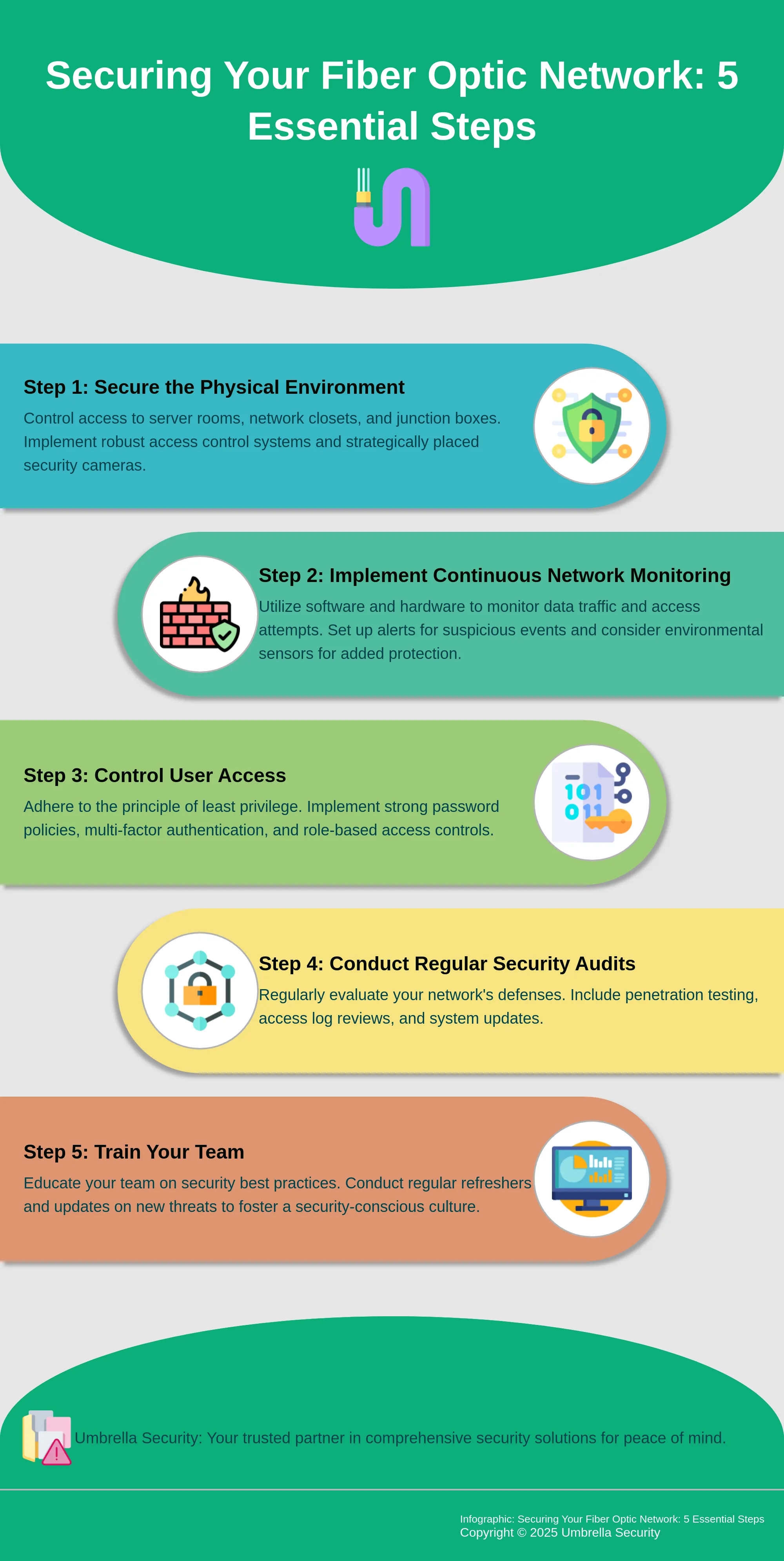
Your network’s security starts with controlling the physical environment. Since fiber optic cables can be tapped if someone gains direct access, securing your infrastructure is the first line of defense. This means locking down server rooms, network closets, and any junction points where cables are exposed. Think beyond a simple lock and key. Securing these areas with modern access control systems ensures only authorized personnel can get near sensitive equipment. Pairing this with strategically placed, high-definition security camera systems provides a visual record and a powerful deterrent against tampering.
Monitor Your Network Continuously
You can’t protect against threats you can’t see. Continuous network monitoring is crucial for detecting unusual activity in real time. This involves using software and hardware to watch for anomalies in data traffic, unauthorized access attempts, and changes in network performance that could signal a breach. Setting up alerts for suspicious events allows your IT team to respond instantly before a minor issue becomes a major incident. Advanced tools like loT sensors can even detect physical tampering by monitoring for changes in light, sound, or temperature within secure areas, adding another layer of protection.
Control Who Has Access
Not everyone on your team needs access to every part of your network. Implementing the principle of least privilege—giving users access only to the information and systems essential for their jobs—drastically reduces your risk. This applies to both digital and physical access. Use strong password policies, multi-factor authentication, and role-based access controls to manage who can log in to network devices. Similarly, implementing strict electronic access control ensures only authorized personnel can enter sensitive areas, creating a clear audit trail of who went where and when.
Conduct Regular Security Audits
Technology and threats are constantly changing, which means your security measures need regular check-ups. A security audit is a systematic evaluation of your network’s defenses. This process helps you identify vulnerabilities in your hardware, software, and configurations before an attacker can exploit them. Audits should include penetration testing, reviewing access logs, and ensuring all systems are updated with the latest security patches. Think of it as a routine physical for your network’s health. Making audits a regular part of your operational calendar helps you maintain a strong security posture over time.
Train Your Team on Best Practices
Your employees can be either your greatest security asset or your biggest vulnerability. Proper training is what makes the difference. Educate your team on security best practices, such as how to spot phishing emails, the importance of secure password management, and the procedures for reporting suspicious activity. This training shouldn’t be a one-time event. Regular refreshers and updates on new threats create a security-conscious culture where everyone understands their role in protecting the organization’s data. When your team is well-informed, they become an active and effective part of your defense strategy.
Advanced Strategies for Maximum Protection
Once you’ve mastered the fundamentals of physical security and access control, you can add more sophisticated layers to your defense. These advanced strategies are designed to protect your network from complex threats and ensure you’re prepared for any scenario. Think of them as moving from a standard security guard to a full-fledged special operations team for your data. By integrating encryption, artificial intelligence, a stringent verification model, and a clear plan of action, you can build a truly resilient security framework. Let’s look at how you can put these powerful tactics to work for your organization.
Encrypt Your Data from End to End
Protecting your data in transit is non-negotiable. End-to-end encryption acts like a digital armored car for your information as it travels through the fiber. This process scrambles your data, making it completely unreadable to anyone without the specific key. Even if a hacker manages to physically tap your fiber optic cable, the information they intercept will be useless. Optical encryption is a powerful method that secures data directly within the light signals. As security specialists note, this ensures that only people with the right key can unlock it. Implementing robust encryption is a core part of our fiber network technology solutions, giving you confidence that your sensitive data remains confidential.
Use AI to Detect Threats Early
Modern security goes beyond just setting up walls; it’s about having intelligent lookouts. Using artificial intelligence and machine learning is like having a security team that never sleeps. These systems learn the normal behavior of your network and can instantly spot unusual activity that might signal a threat. Instead of waiting for an alarm to go off, AI can detect subtle anomalies in data patterns, allowing you to address potential breaches before they cause damage. As industry trends show, the future of network security involves leveraging AI for network optimization and threat detection. This proactive approach is similar to how our advanced air, light, and sound sensors identify environmental changes to prevent incidents.
Adopt a Zero Trust Architecture
The old “trust but verify” mindset is outdated. A Zero Trust architecture operates on a simple, powerful principle: never trust, always verify. This model assumes that threats could be anywhere, both inside and outside your network. Every single request for access is treated as a potential threat until it’s fully authenticated and authorized. This means verifying users, devices, and applications every time they try to connect. It’s a major step up from traditional security, which often focused only on perimeter defense. Implementing Zero Trust also involves a cultural shift, requiring ongoing employee training on security best practices to reinforce that everyone has a role in protecting the network. Strong access control systems are the foundation of this strategy.
Create a Solid Incident Response Plan
Even with the best defenses, you need a playbook for when things go wrong. A solid incident response plan is your guide to navigating a security breach calmly and effectively. The goal is to minimize damage and get your operations back to normal as quickly as possible. Service disruptions can happen for many reasons, from software bugs to malicious attacks, making preparation essential. Your plan should clearly define roles, outline steps for identifying and containing a threat, and detail the recovery process. A key component is communication, which is where tools like emergency mass notification systems become critical for keeping your team and stakeholders informed throughout the incident.
How to Build a Lasting Security Framework
A truly secure network relies on more than just advanced technology; it requires a solid framework of policies, procedures, and people working together. Building this framework is about creating a sustainable security culture that protects your organization from the inside out. It involves defining clear rules, understanding your specific vulnerabilities, and ensuring your team is prepared. By taking a structured approach, you can move from a reactive security posture to a proactive one, where potential threats are identified and addressed before they become problems. This framework becomes the backbone of your entire security strategy, guiding your decisions and ensuring every layer of your defense is strong and cohesive.
Align with Industry and Compliance Standards
Every industry has its own set of rules and regulations for data protection. For organizations in finance, healthcare, or government, handling private information means adhering to strict compliance standards like PCI DSS or HIPAA. Aligning your security framework with these standards isn’t just about avoiding fines; it’s about building trust with your clients and stakeholders. Start by identifying all the regulations that apply to your business. From there, you can build your security policies to meet or exceed those requirements. This ensures your fiber network technology solutions are not only technically sound but also fully compliant with legal and industry expectations.
Develop Clear Security Policies
Your security policies are the official rulebook for your organization. They should clearly outline acceptable use, define security protocols for handling data, and detail procedures for everything from password management to physical access to server rooms. To get started, conduct a thorough assessment of your current network to understand its architecture and potential weak points. Use this information to create straightforward, easy-to-understand policies that leave no room for ambiguity. When everyone on your team knows what’s expected of them, they are better equipped to help protect your network and its valuable data.
Define Your Risk Assessment Process
While fiber optic cables are inherently more secure than copper, no system is completely immune to risk. A formal risk assessment process helps you proactively identify, evaluate, and prioritize potential threats to your network. This involves looking at everything from physical vulnerabilities, like unsecured access points, to digital threats, like sophisticated hacking attempts. By regularly performing these assessments, you can find and fix weak spots before they can be exploited. This process is fundamental to maintaining robust access control systems and ensuring your security measures evolve alongside emerging threats.
Implement Ongoing Staff Training
Your employees are your first and most important line of defense. A security framework is only as strong as the people who follow it. That’s why ongoing training is so critical. Regular security awareness sessions can educate your team about potential threats, like phishing scams and social engineering, and teach them the best practices for mitigating those risks. When your staff understands the “why” behind security policies, they become active participants in protecting your organization’s assets. This helps create a culture of security where everyone feels a sense of shared responsibility.
Formalize Your Auditing Process
To ensure your security framework remains effective, you need a formal process for auditing it. Regular audits and security checks help you verify that your policies are being followed and that your technical defenses are working as intended. This includes reviewing access logs, testing for vulnerabilities, and inspecting physical security measures. Think of it as a routine health check for your network. These audits provide valuable insights, helping you find and fix any gaps before they can cause problems and ensuring your security camera systems and other tools are always performing optimally.
What’s Next in Fiber Optic Security?
The world of network security is always moving forward, and fiber optics is no exception. As technology evolves, so do the methods for protecting these critical data pathways. Staying ahead means keeping an eye on the innovations that are shaping the future of security. From leveraging artificial intelligence to exploring the principles of quantum physics, the next wave of fiber optic security is focused on creating smarter, more resilient, and virtually impenetrable networks. Here’s a look at what’s on the horizon.
The Rise of Quantum Security
Imagine a security system that’s fundamentally unbreakable. That’s the promise of quantum encryption, an emerging field that uses the principles of quantum mechanics to protect data. Instead of relying on complex math problems, it uses the physical properties of photons to create secure keys. Any attempt to intercept the key would disturb the photons, immediately alerting you to a breach. While the technology is still developing, quantum encryption represents a massive leap forward in securing fiber optic networks against even the most sophisticated future threats.
Smarter Security with AI and Machine Learning
Artificial intelligence (AI) and machine learning are becoming essential tools in the security expert’s toolkit. Instead of just reacting to known threats, these smart systems proactively hunt for unusual activity. AI can learn what your network’s normal behavior looks like and instantly flag any deviations that could signal an attack. This allows for faster threat detection and response, often before any real damage is done. The continued evolution of Artificial Intelligence & Machine Learning will lead to more automated and predictive network security, helping you stay one step ahead of potential intruders.
Next-Generation Threat Detection
Cybercriminals are constantly developing new ways to get around security measures. That’s why the future of fiber security relies on next-generation threat detection systems that are as dynamic as the threats they face. These advanced systems go beyond simple signature-based scanning. They use behavioral analysis to identify suspicious patterns and can even predict potential attacks based on subtle network changes. As attackers refine their methods, keeping up with the latest network security trends and investing in proactive detection tools is no longer just an option—it’s a necessity for protecting your data.
Advanced Network Monitoring Tools
You can’t protect what you can’t see. Advanced network monitoring tools provide deep, real-time visibility into your fiber optic infrastructure, giving you a clear picture of data flow and system health. These platforms are crucial for spotting anomalies, managing access, and ensuring everything is running smoothly. But even the best tool is only as effective as the person using it. That’s why combining powerful monitoring software with regular team training is so important. Properly safeguarding critical infrastructure depends on empowering your staff with the knowledge and tools they need to identify and respond to threats effectively.
Related Articles
- Network Infrastructure Security in Chicago, IL | Umbrella
- Network Infrastructure Cyber Security Solutions-Umbrella
- IoT Security Solutions: A Guide for Businesses – Umbrella Security Systems
- Best Practices for Secure Infrastructure Design – Umbrella Security Systems
Continue camera-system planning with our guides to surveillance camera coverage, wide dynamic range for difficult lighting, and commercial video surveillance systems.
Camera selection should also consider indoor versus outdoor security cameras and night-vision cameras for businesses.
Frequently Asked Questions
I thought fiber optic cables were impossible to tap. Is that not true? That’s a common belief, and while it’s true that tapping fiber is incredibly difficult compared to traditional copper wire, it’s not entirely impossible. An attacker with sophisticated tools can bend a cable to capture the faint light signals that leak out. However, this act almost always disrupts the signal in a way that’s immediately detectable. The key takeaway is that the physical nature of fiber makes any attempt at eavesdropping loud and obvious, which is a massive security advantage over copper cables that can be tapped silently.
What’s the most important first step to securing our fiber network? If you do only one thing, start by network infrastructure security naperville il. Your network is most vulnerable where someone can physically touch it—in server rooms, network closets, and at junction boxes. Implementing strong access control for these areas is the most effective first step. By controlling who can get near your critical infrastructure, you eliminate the vast majority of opportunities for tampering or sabotage before they can even happen.
How does securing my fiber network relate to my building’s security, like cameras and access control? Think of it as one cohesive system. Your fiber network is the central nervous system that carries all the data from your security devices. If that network is compromised, your high-definition cameras and advanced door readers could be rendered useless. A secure fiber network ensures the information from your access control system and video surveillance feeds is transmitted reliably and without interference. They all work together to create layers of protection for your entire facility.
Why is employee training so important if the technology is already secure? Technology is only one piece of the puzzle. A person who is tricked into giving away their credentials can bypass even the most advanced technical defenses. Your team is your first line of defense against threats like phishing and social engineering. Consistent training creates a security-conscious culture where everyone understands their role in protecting company data. It turns your staff from a potential vulnerability into your greatest security asset.
We already encrypt our data. Do we still need to worry about physical security for the network? Yes, absolutely. Encryption and physical security are two different layers of defense that protect you from different types of threats. Encryption protects your data if it gets intercepted, ensuring it’s unreadable. Physical security, on the other hand, prevents someone from intercepting the data in the first place. It also protects your equipment from being damaged or disabled, which could take your entire operation offline. A strong security strategy requires both to be truly effective.
For the planning side of this topic, see our guide to network security infrastructure design.