
Emergency Mass Notification Systems Built for Clear, Coordinated Response
Umbrella Security designs and integrates emergency communication systems for schools, healthcare facilities, manufacturing plants, government buildings, offices, multifamily properties, and multi-building commercial campuses. The goal is simple: deliver the right instruction to the right people through multiple channels—and make the response workflow testable before an emergency occurs.
More than a text-message platform
A complete system connects detection, decisions, messages, and actions
An emergency mass notification system helps an organization communicate during severe weather, fire, security incidents, evacuation, shelter-in-place, medical emergencies, operational disruptions, and other defined events. It may use speakers, strobes, digital signage, desktop alerts, SMS, email, mobile applications, intercoms, and other channels to reach people inside and outside a facility.
Technology is only one part of the solution. The organization must also decide who can initiate an alert, which messages are preapproved, how locations are selected, what happens if one channel fails, and how staff verify that the instruction reached the intended audience.
Umbrella maps those decisions before selecting equipment. That prevents a common failure: installing several notification products that can send messages but do not produce one coordinated response.
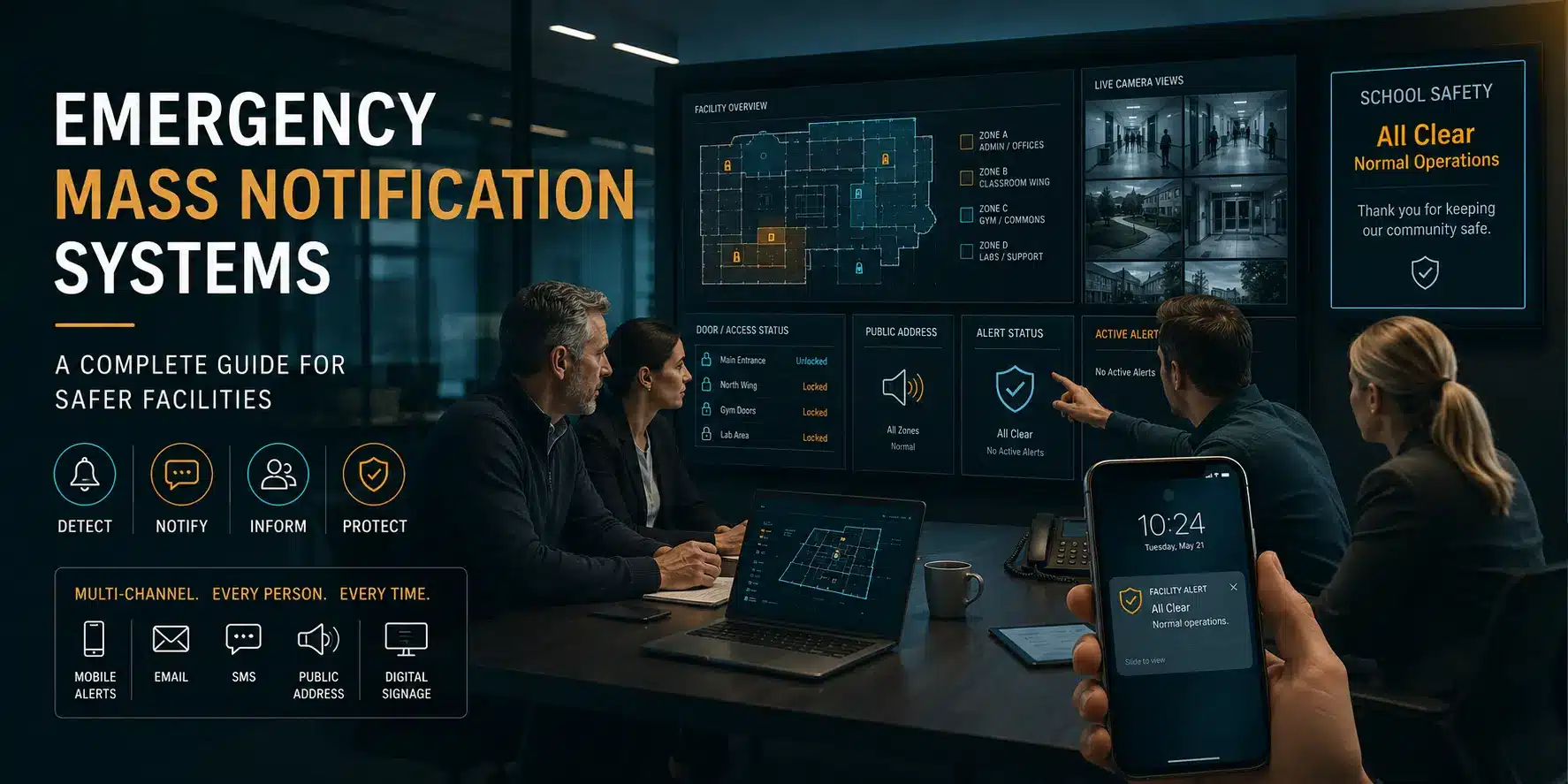
System components
Reach people wherever the emergency finds them
No single channel reaches every person in every condition. An effective design combines the methods that fit the building, workforce, risk profile, accessibility needs, network, and operating procedures.
Voice and Paging
Network speakers, amplifiers, intercoms, and zoned audio deliver intelligible instructions to selected rooms, floors, buildings, exterior areas, or an entire campus.
Visual Notification
Strobes, message boards, and digital signage reinforce audible instructions in high-noise spaces, public areas, and locations where occupants may not hear an announcement.
Mobile and Desktop Alerts
SMS, email, push notifications, desktop popups, and collaboration tools can reach employees, administrators, contractors, and other defined groups beyond the building.
Activation and Templates
Authorized users need simple activation, location selection, message templates, approvals, and escalation rules that reduce hesitation and errors during a high-pressure event.
System Integrations
Access control, video surveillance, intrusion alarms, fire interfaces, panic devices, weather feeds, and digital signage can provide context or initiate approved response actions.
Monitoring and Accountability
Event history, delivery status, device supervision, testing records, and administrative logs help teams confirm performance and identify communication gaps.
Operational workflow
Design the full path from an event to a verified response
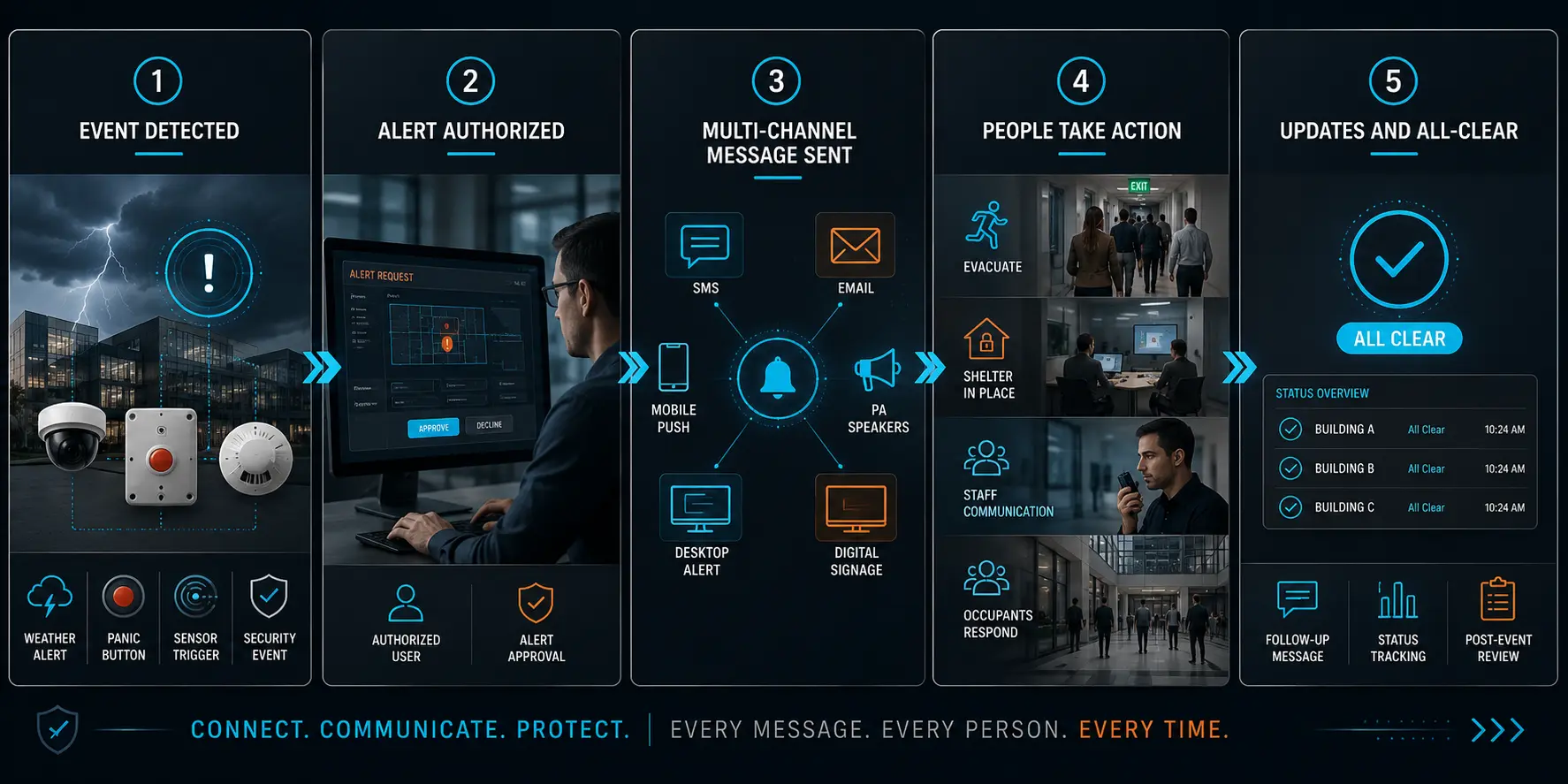
A notification system should not depend on someone improvising under pressure. Umbrella documents the intended sequence and then tests the technology against it.
A person, sensor, alarm, weather source, or connected platform identifies an event that requires action.
The designated role validates the event when required and selects the approved scenario, audience, and locations.
Messages are delivered through the configured channels while integrated systems support the defined response.
Teams confirm delivery, document the event, review performance, and correct any device or process gaps.
Multi-building and campus planning
Send specific instructions without creating unnecessary confusion
A multi-building property may need to alert one room, one floor, one building, a group of employees, or the entire campus. A severe-weather instruction may differ from an evacuation, security lockdown, medical emergency, hazardous-material event, or operational shutdown.
The design should support clear zoning and permissions. Staff should understand who is authorized to send each type of message, how secondary users take control, and what happens when internet, power, or a primary communication path is unavailable.
- Location and audience zoning
- Role-based activation permissions
- Preapproved scenario templates
- Redundant communication channels
- Accessible audible and visual methods
- Remote and after-hours personnel
- Testing and device supervision
- Multi-building reporting and administration
Connected physical security
Use integrations to add context and accelerate approved actions
Emergency communication becomes more useful when it is coordinated with the systems people already operate. A panic input may bring up the relevant video surveillance view. An approved lockdown procedure may change selected access control states. A digital signage system may display the same instruction being delivered by speakers and mobile alerts.
Those connections must be designed carefully. Umbrella defines which platform owns each action, who can override it, what happens when an integration is unavailable, and how the organization returns to normal operation. We do not assume that two products being technically compatible automatically creates a safe emergency workflow.
For high-noise manufacturing areas, public spaces, schools, healthcare facilities, and large commercial campuses, this coordination can reduce ambiguity and help people act on one consistent set of instructions.
Assessment and deployment
What a complete emergency notification assessment should cover
The right starting point is a review of the property, current systems, communication requirements, emergency procedures, and known failure points. A useful assessment produces a practical scope—not a product catalog.
Facilities and Audibility
Document indoor and exterior zones, high-noise areas, public spaces, accessibility considerations, speaker coverage, existing paging, signage, and power or network constraints.
People and Permissions
Define initiators, approvers, administrators, recipient groups, visitors, contractors, remote employees, first-responder coordination, and after-hours responsibilities.
Scenarios and Messages
Map severe weather, evacuation, shelter-in-place, security, medical, operational, and site-specific events with approved language and escalation paths.
Technology and Integrations
Review speakers, strobes, endpoints, mobile services, digital signage, access control, video, alarms, panic inputs, APIs, licensing, and support responsibilities.
Resilience and Recovery
Plan for power, internet, server, endpoint, and administrator failures. Define alternate communication methods and the process for restoring normal system state.
Testing and Documentation
Establish acceptance tests, message verification, drills, device supervision, staff training, maintenance, change control, and evidence that the deployed system matches the approved design.
Common planning questions
Emergency mass notification system FAQs
What is the difference between mass notification and an emergency alert tool?
An alert tool may send messages through one channel or to one audience. A complete mass notification system coordinates multiple indoor and outdoor channels, locations, recipient groups, permissions, templates, integrations, and verification around defined emergency procedures.
Can a notification system integrate with access control and video surveillance?
Yes, when the platforms and approved procedures support the intended connection. Integrations can add context or automate specific actions, but the organization should define ownership, overrides, failure behavior, and return-to-normal steps before deployment.
How do we plan for a large multi-building commercial campus?
Begin with zones, audiences, emergency scenarios, initiator roles, existing communication systems, network and power dependencies, accessibility, redundancy, and testing. The design should support targeted messages as well as campus-wide communication.
What should an installation contract include?
It should define system scope, locations, performance expectations, integrations, network and power responsibilities, licensing, configuration, message templates, acceptance testing, training, documentation, warranty, maintenance, and long-term support.
Comparing platform categories and vendor approaches? Review our emergency notification system vendors guide.
Plan before the emergency
Turn disconnected alert tools into one testable response system
Umbrella Security can assess your existing environment, map the required communication workflow, and design a phased emergency notification plan for a single building or multi-building campus.