
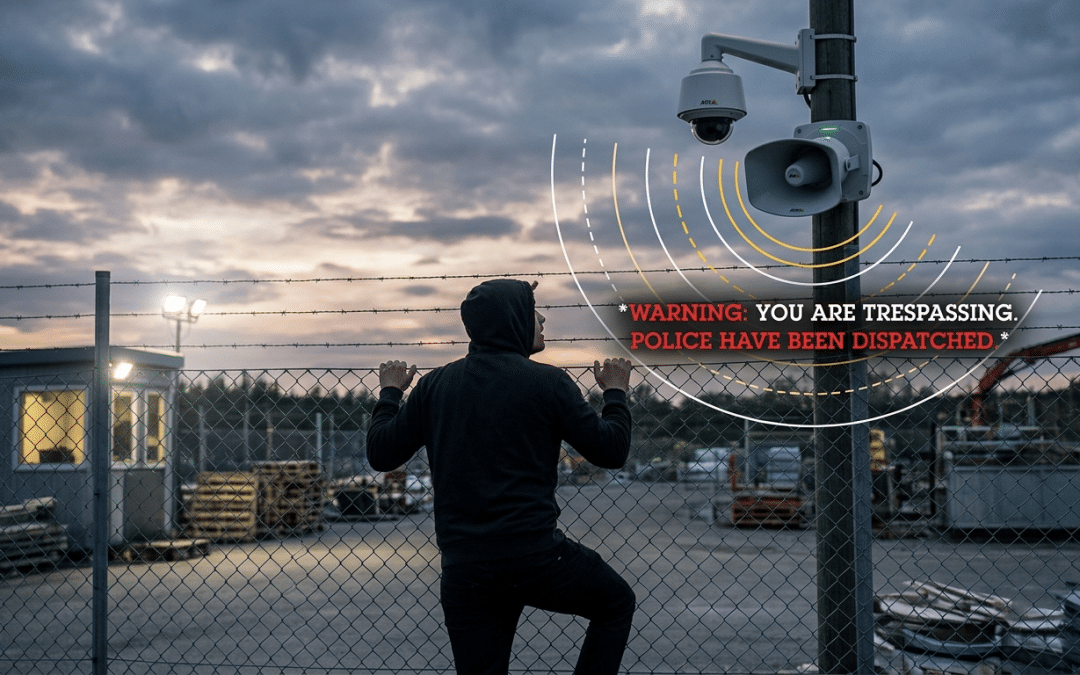

Axis Camera Analytics for Municipalities: 7 Powerful Ways to Deter Vandalism
A practical guide for local governments using Axis cameras, AXIS Camera Station Pro, edge analytics, mobile alerts, and network speakers to protect parks, public works yards, utility sites, and municipal buildings.
Axis camera analytics for municipalities can help local governments move from passive video recording toward earlier detection, alerting, and deterrence. That matters because municipal vandalism rarely stops at the cost of paint, glass, locks, or damaged equipment. It also creates staff time, public complaints, park closures, insurance friction, and repeat calls for public works or law enforcement.
Traditional camera systems help municipalities investigate vandalism after it happens. That still matters. But the stronger question is this:
Can a municipal camera system help detect suspicious behavior before damage occurs?
For municipalities using or considering Axis cameras, compatible edge analytics, AXIS Camera Station Pro, and Axis network audio can support a more proactive vandalism deterrence strategy. The goal is not to over-monitor public spaces. The goal is to protect specific municipal assets during specific risk windows, such as after-hours activity near parks, public works yards, utility sites, building exteriors, and restricted areas.
For broader public-sector planning, Umbrella’s government security systems work covers integrated video surveillance, access control, alarms, and intercom-enabled entry points across municipal and public-sector environments.
When designed correctly, the system can detect behaviors like loitering, fence-line movement, after-hours presence, or camera tampering, then trigger alerts, audio warnings, event bookmarks, or staff review workflows. That is where Axis camera analytics for municipalities can create value beyond passive recording.
Article roadmap
Need to know whether your current municipal cameras can support Axis analytics?
Umbrella Security can review your camera inventory, identify vandalism-prone areas, evaluate AXIS Camera Station Pro options, and design a practical alert and audio deterrence workflow.
Start with a Municipal Camera Analytics AssessmentWhy Vandalism Is a Different Security Problem for Municipalities
Municipal properties are hard to secure because they are often public-facing by design. Parks, plazas, administrative buildings, public works facilities, water sites, commuter areas, and community spaces are not the same as a private warehouse or fenced commercial yard.
Many of these spaces need to remain accessible during normal hours while still being protected after hours. That creates a difficult balance between public access, privacy, staffing limits, and property protection.
| Municipal Challenge | Why It Matters | Better Security Response |
|---|---|---|
| Open public access | Many areas are intentionally accessible during the day. | Use schedules so analytics focus on after-hours risk windows. |
| After-hours exposure | Damage often happens when staffing is low. | Trigger alerts or audio warnings when defined behaviors occur. |
| Large outdoor footprints | Parks, lots, yards, and utility sites are difficult to patrol continuously. | Use cameras, analytics, and speakers by zone, not as one broad system. |
| Limited staff resources | Public works and police departments cannot physically monitor every location. | Escalate only meaningful events to reduce alarm fatigue. |
| Evidence requirements | If an incident happens, video must be usable, searchable, and exportable. | Connect analytics to bookmarks, search, and investigation workflows. |
| Privacy expectations | Public-space monitoring must be designed responsibly. | Use targeted zones, documented policies, and limited access permissions. |
For these reasons, municipalities should avoid generic “more cameras” thinking. The better strategy is to define the behavior that creates risk and then design the system around detecting and responding to that behavior.
How Axis Camera Analytics for Municipalities Support Earlier Detection
Axis camera analytics for municipalities are useful because they can move detection closer to the camera. Rather than relying only on centralized review after an incident, compatible Axis cameras can analyze scene activity at the edge and generate events when configured conditions are met.
Axis states that AXIS Object Analytics comes preinstalled on compatible Axis network cameras at no extra cost and processes live video directly on the camera. It can classify humans, vehicles, and vehicle types, and can support detection scenarios tailored to the scene. Source: Axis Communications
Advisor note
Do not sell analytics as magic. Sell them as a configured workflow. The value comes from camera selection, angle, lighting, detection zone, schedule, event rule, speaker placement, and staff response — not from checking a box labeled “AI.”
Key Analytics for Municipal Vandalism Deterrence
The best analytic depends on the site, camera model, scene, lighting, and behavior being targeted. Axis camera analytics for municipalities work best when the system is designed around a specific behavior, not a vague goal like “better surveillance.” For vandalism-prone sites, Axis camera analytics for municipalities should be configured around the behaviors that actually precede damage.

Loitering and time-in-area analytics can help identify suspicious after-hours behavior near vandalism-prone municipal assets.
| Analytic or Feature | Best Municipal Use Case | How It Helps |
|---|---|---|
| AXIS Object Analytics | Parks, lots, building exteriors, restricted areas | Detects and classifies humans and vehicles so the system can respond to defined behaviors instead of generic motion. |
| Time-in-area / Loitering detection | Walls, shelters, monuments, gates, equipment areas | Flags when a person remains in a sensitive area longer than expected, especially after hours. |
| Fence-line / Perimeter analytics | Public works yards, utility sites, water facilities, storage areas | Helps detect people or vehicles entering restricted zones or crossing defined virtual boundaries. |
| Camera tampering / image health | Cameras exposed to spray paint, covering, impact, or redirection | Alerts staff when the camera view is blocked, moved, or compromised. |
| License plate recognition | Municipal lots, restricted depots, fleet yards, vehicle gates | Supports vehicle-based investigations and controlled-access use cases where policy allows. |
| Network audio integration | Parks, lots, public works yards, utility sites | Turns an analytic event into an immediate warning message or staff announcement. |
| Smart search tools | Post-incident investigation | Helps staff find people, vehicles, and relevant events faster than manually reviewing long recordings. |
Example Workflow: After-Hours Activity at a Park or Public Works Yard
A municipality wants to reduce graffiti and damage near a pavilion, restroom building, skate park, public works fence line, or outdoor equipment area. Instead of relying only on recorded video, the system can be designed around an event workflow. In this context, Axis camera analytics for municipalities help define when the system should alert, record, warn, or escalate.

A fence-line analytic event can trigger a mobile alert so municipal staff can review suspicious activity quickly.
| Layer | Configuration Example |
|---|---|
| Camera placement | Axis camera aimed at the vulnerable wall, structure, gate, fence line, or gathering area. |
| Analytic trigger | Detect a person inside a defined zone for more than a set amount of time after hours. |
| Schedule | Active only from 10:00 PM to 5:00 AM, or according to site closure rules. |
| Action rule | AXIS Camera Station Pro or camera event logic receives the analytic event and triggers a response. |
| Audio deterrent | Axis network speaker plays a pre-approved warning message. |
| Operator alert | Monitoring staff receive a pop-up, event bookmark, or notification. |
| Evidence handling | Video is retained and searchable if the event becomes an investigation. |
A sample audio message might be: “Attention. This area is closed. Your activity is being recorded. Please leave the property immediately.”
The message should be clear, lawful, and professionally worded. It should not sound threatening or improvised.
How AXIS Camera Station Pro Connects Alerts, Audio, and Investigation
AXIS Camera Station Pro is the operational layer that helps connect cameras, analytics, alerts, audio, access control, and investigations. Axis describes it as a video management system verified with Axis cameras, intercoms, body worn cameras, analytics, and audio products, including integration with AXIS Audio Manager Pro. Source: Axis Communications
For municipal vandalism deterrence, the key is not simply viewing cameras. The key is connecting the analytic event to the right response. For facilities comparing cameras, recording, storage, remote access, and long-term ownership, Umbrella’s commercial security camera systems page explains the broader system design approach.
| AXIS Camera Station Pro Function | Municipal Value |
|---|---|
| Live view | Operators can see the scene when an event is triggered. |
| Event workflows | Analytics can trigger alerts, recordings, bookmarks, or other responses. |
| Smart search | Staff can locate relevant footage faster after an incident. |
| Maps and layouts | Operators can understand where the event occurred. |
| Audio integration | Staff can use pre-recorded clips or live voice communication where appropriate. |
| Access control integration | Helpful for municipal buildings, gates, staff-only areas, and public works yards. |
Axis also states that Smart Search in AXIS Camera Station Pro uses data from cameras to classify objects and help locate incidents in recorded video. Source: Axis Communications
Perimeter Protection for Public Works, Utilities, and Restricted Sites
Some municipal sites need stronger perimeter protection than a public park or plaza. Public works yards, water treatment facilities, utility sites, storage yards, and fuel areas often contain valuable equipment or critical infrastructure. For municipal buildings, depots, gates, and restricted staff areas, analytics should also be coordinated with access control systems so video events, gate activity, and credential use can be reviewed together.

Perimeter analytics are especially useful for public works yards, utility sites, water facilities, and other restricted municipal locations.
Axis describes AXIS Perimeter Defender as an edge-based intrusion system using motion- and AI-based detection at long distances to detect and classify humans and vehicles in restricted areas. Axis also positions it for long-range detection and high-security perimeter protection, especially with thermal cameras. Source: Axis Communications
Best-fit municipal locations
Use perimeter analytics where the site has a clearly restricted boundary: public works yards, gated fleet lots, water facilities, equipment storage, substations, utility infrastructure, and other areas where people are not supposed to be after hours.
Why Audio Deterrence Matters
Many vandalism incidents are opportunistic. The person may assume no one is watching, no one will respond, or the camera is only useful after the fact. A visible camera helps. But a camera paired with a real-time speaker message changes the psychology of the moment.
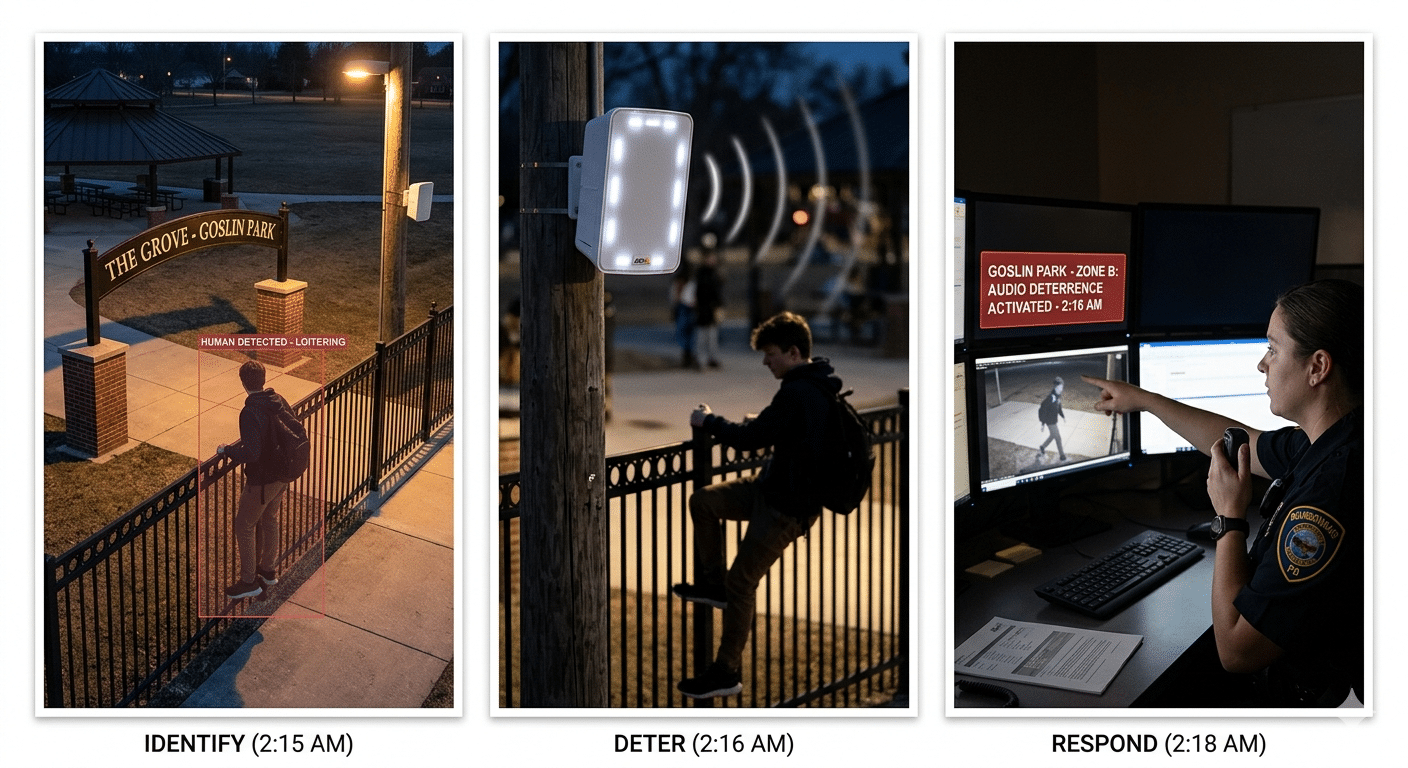
Network audio can turn a camera analytic event into an immediate deterrent message before property damage occurs.
The person now knows the system detected them, their activity is being recorded, and a response may be coming. That does not guarantee prevention, but it can reduce the likelihood of damage, especially in low-risk opportunistic vandalism scenarios.
Axis documentation for network audio and AXIS Camera Station explains workflows where Axis network audio devices can be associated with cameras and used to play audio clips or support announcements. Source: Axis Communications
How multiple speakers can work together
For larger municipal areas, one speaker may not be enough. A park, public works yard, outdoor storage area, or municipal campus may need several speakers covering different zones. The camera analytic should trigger the speaker group closest to the event so the response is targeted and does not create unnecessary noise across the entire site.
Where Municipalities Should Use Analytics First
Not every camera needs analytics. Not every public area should trigger alerts. Axis camera analytics for municipalities should start with locations where the risk and operational value are clear.
The best first project is usually a high-complaint, repeat-incident location where the municipality already knows the pain is real.
What to Verify Before Enabling Axis Analytics
Some Axis analytics are available at no extra cost on compatible Axis cameras, but municipalities should not assume every desired feature will work on every camera. Once the analytic workflow is defined, proper commercial security camera installation becomes critical because camera angle, mounting height, lighting, cabling, PoE switching, and testing affect whether analytics work reliably.
Axis’s support materials for AXIS Object Analytics state that the application comes pre-installed with AXIS OS on compatible cameras and cannot be downloaded separately. Axis also notes firmware requirements, including AXIS OS 10.2 or later for MLPU cameras and 10.3 or later for DLPU cameras. Source: Axis Communications
Before enabling Axis camera analytics for municipalities, confirm the camera model, firmware, mounting angle, lighting, VMS configuration, and staff response process. This validation step keeps Axis camera analytics for municipalities grounded in real-world performance rather than assumptions from a product datasheet.
| Requirement | Why It Matters |
|---|---|
| Camera model compatibility | Not every Axis camera supports every analytic. |
| Firmware version | Some analytics require specific AXIS OS versions. |
| Processor capability | More advanced analytics may require newer camera hardware. |
| Lighting conditions | Poor lighting can reduce detection accuracy. |
| Mounting height and angle | Bad placement creates bad analytics. |
| VMS licensing | AXIS Camera Station Pro licensing and deployment model should be confirmed before purchase. |
| Network design | Speakers, cameras, switches, servers, storage, and remote access must be planned together. |
| Policy and privacy | Public-space monitoring needs a clear operational policy and access controls. |
Common Mistakes to Avoid
| Mistake | Better Approach |
|---|---|
| Using analytics as a sales feature instead of a designed workflow | Start with the incident type, response process, and evidence requirement. |
| Pointing cameras too wide | Design for usable detection zones, not just broad coverage. |
| Running audio warnings all day | Use schedules, zones, thresholds, and approved messages. |
| Ignoring privacy concerns | Limit analytics to defined use cases and avoid unnecessary monitoring. |
| Assuming existing cameras support everything | Verify model, firmware, processor, and analytic compatibility. |
| Creating too many alerts | Tune rules so staff only receive meaningful events. |
| Forgetting lighting | Vandalism often happens at night, so camera and lighting design must match that reality. |
| Not training staff | Operators need to know what the alert means and what to do next. |
How Umbrella Helps Municipalities Design This Correctly
Umbrella Security designs commercial and government security systems around real-world use cases, not just equipment lists. For municipalities, that means looking at the property, the public use pattern, the risk profile, the staff workflow, and the long-term support requirements before recommending a system.
A proper municipal vandalism prevention design may include Axis cameras selected for the scene and analytic requirement, AXIS Camera Station Pro configuration, defined analytic zones and schedules, speaker placement and audio coverage planning, network switch and PoE planning, storage and retention planning, operator alert workflows, privacy-conscious design, staff training, and long-term support.
For a related public-sector proof point, see Umbrella’s government security system upgrade case study. If the municipality is still defining risk, Umbrella’s physical security risk assessment guide can help frame site vulnerabilities before equipment decisions are made.
Need a practical plan before buying more cameras?
Umbrella can assess your current camera inventory, identify vandalism-prone locations, and design an Axis analytics and audio deterrence workflow around real site conditions.
Final Takeaway
Municipal vandalism prevention is not solved by simply adding more cameras. Axis camera analytics for municipalities should be treated as part of a complete workflow that can detect risky behavior, alert the right people, trigger a measured deterrent, and preserve searchable evidence if an incident occurs.
Axis cameras, AXIS Camera Station Pro, video analytics, and network speakers can give municipalities a practical way to move from passive recording to proactive protection. When planned carefully, Axis camera analytics for municipalities can support earlier detection, clearer response workflows, and better evidence review.
For public works yards, parks, municipal buildings, utility sites, and public spaces, that can mean fewer repair costs, faster investigations, and better protection of public assets.
FAQ
Can Axis cameras help municipalities prevent vandalism?
Compatible Axis cameras can help municipalities detect suspicious behavior earlier, such as after-hours presence, loitering, fence-line movement, or camera tampering. Axis camera analytics for municipalities can also connect those events to AXIS Camera Station Pro and network audio, allowing alerts or deterrent messages that may reduce the chance of property damage.
Do all Axis cameras support video analytics?
No. Axis analytics depend on the camera model, firmware version, processor capability, mounting location, lighting, and the specific analytic being used. Municipalities should audit their existing camera inventory before assuming a feature is supported.
Are Axis analytics free with Axis cameras?
Some Axis analytics, including AXIS Object Analytics on compatible cameras, are available at no extra cost. Municipalities should still verify camera compatibility, firmware requirements, AXIS Camera Station Pro licensing, server requirements, storage needs, and network design.
Can Axis cameras trigger a speaker warning?
Yes. In a properly configured Axis system, an analytic event from a compatible camera can trigger an action rule or event workflow, such as playing a pre-recorded warning message through an Axis network speaker.
What municipal sites are best for vandalism deterrence analytics?
Good starting points include public works yards, parks, utility sites, municipal building exteriors, transit shelters, commuter lots, storage areas, and other repeat-problem locations where after-hours vandalism creates repair costs or public complaints.
Does AXIS Camera Station Pro help with investigations?
Yes. AXIS Camera Station Pro supports investigation workflows such as viewing recorded video, searching for relevant activity, managing events, and exporting evidence. Smart search capabilities can help operators find relevant footage faster than manually reviewing long recording periods.
Editorial note: This article is written as practical guidance for municipal buyers and facility leaders. Product compatibility, licensing, firmware requirements, privacy policy, public records obligations, and local legal requirements should be verified before deployment.
Protect public assets with a system designed around real behavior.
Umbrella can help your municipality review existing cameras, identify vulnerable sites, and design an Axis analytics workflow that connects detection, alerts, audio, and investigation.