
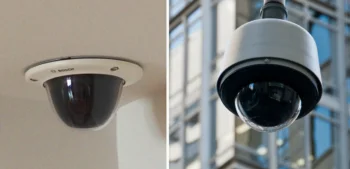
Indoor and outdoor security cameras aren’t interchangeable — and treating them as such leads to failed equipment, poor coverage, and wasted investment. The differences go beyond weatherproofing. They involve mounting, lighting conditions, resolution requirements, network infrastructure, and the specific threats each camera type is designed to address. Understanding those differences is what separates a well-designed commercial security camera system from a collection of cameras that technically work but don’t actually protect the facility.
This guide covers the key differences between indoor and outdoor security cameras, what each type needs to perform reliably, and how to design coverage that addresses both interior and exterior threats.
Indoor vs. Outdoor Security Cameras: The Core Differences
The fundamental difference is environmental tolerance. Indoor cameras operate in controlled environments — stable temperatures, predictable lighting, protection from precipitation and physical tampering. Outdoor cameras face everything else: temperature swings, rain, snow, wind, dust, direct sunlight, and the elevated risk of deliberate interference from people who don’t want to be recorded.
This environmental difference drives nearly every other specification decision:
- Weatherproofing: Outdoor cameras require IP66 or higher ingress protection ratings. IP66 protects against powerful water jets; IP67 and IP68 add submersion protection for cameras in areas with significant water exposure. Indoor cameras typically carry IP41 or IP42 ratings — adequate for the environment but not for outdoor use.
- Operating temperature: Outdoor cameras in Chicago need to function reliably from -40°F (polar vortex conditions) to 110°F+ (summer direct sun on a dark housing). Standard indoor cameras are typically rated to 14°F at the low end — inadequate for Chicago winters.
- Physical construction: Outdoor cameras use heavier-gauge housings, tamper-resistant mounting hardware, and in some cases IK10 impact ratings that protect against deliberate physical attack. Indoor cameras can be lighter and more aesthetically unobtrusive.
- IR illumination range: Outdoor cameras covering parking lots and perimeters need IR ranges of 100–200ft or more. Indoor cameras covering a 20-foot conference room need far less.
Outdoor Security Camera Placement and Coverage
Every exterior entry point to a facility should have outdoor camera coverage — not just the main entrance. This means:
- All exterior doors, including loading docks, emergency exits, and employee entrances
- Vehicle entry points — gates, parking lot entrances, and loading dock approaches
- Building corners, covering the perimeter between fixed entry point cameras
- High-value exterior areas — dumpster enclosures, generator locations, utility areas
- Parking lots and vehicle staging areas
Most commercial installations use relatively few outdoor cameras compared to interior coverage — but those cameras carry significant weight because they’re the first layer of detection. An intruder captured on exterior cameras before they reach the building is far more useful than footage captured inside after entry has already occurred.
Outdoor Camera Mounting Considerations
Outdoor camera installations add complexity that indoor installations don’t require:
- Weatherproof conduit and enclosures: Cable runs must be protected from moisture infiltration at entry points — a common failure mode when outdoor cameras are installed by installers without commercial experience
- Structural mounting: Cameras mounted on building exteriors need appropriate anchoring hardware for the substrate — brick, concrete, steel, and wood each require different fastening approaches
- Licensed electrical work: Outdoor camera installations often require licensed electrical contractors when running new circuits, particularly for cameras requiring dedicated power runs rather than PoE
- Special equipment: High-mounted cameras on tall buildings or light poles may require aerial lifts for installation and future maintenance — a cost that should be factored into the total project budget
- Permit requirements: Some municipalities require permits for certain exterior camera installations, particularly those involving conduit runs or new electrical work
Indoor Security Camera Placement and Coverage
Indoor camera placement follows a different logic — coverage of interior access points, high-value areas, and common spaces where incidents are most likely to occur or most important to document:
- Interior entry points: Lobbies, reception areas, and interior door access points where people transition between spaces
- High-value areas: Server rooms, pharmacy storage, cash handling areas, executive offices, and any space with concentrated value or sensitive information
- Common areas: Hallways, break rooms, and shared spaces where general activity can be monitored and incidents documented
- Transaction points: Cash registers, reception desks, and any area where exchanges occur that may require documentation
- Loading and receiving areas: Interior dock areas where inventory transfers happen and discrepancies most commonly occur
Indoor Camera Flexibility and Wireless Options
Modern indoor cameras offer more deployment flexibility than outdoor cameras. Wireless models connect to your network and run on batteries, allowing repositioning as facility needs change — useful for temporary coverage of renovation areas, event spaces, or seasonal inventory zones. However, wireless indoor cameras have limitations: battery life requires monitoring, RF interference can affect reliability in dense environments, and battery-operated cameras typically lack the continuous recording capability of hardwired systems.
For permanent indoor coverage of high-value or high-priority areas, hardwired PoE cameras remain the standard — more reliable, lower maintenance, and easier to integrate with NVR recording systems. Small dome cameras can be permanently installed near smoke detectors, in ceiling tiles, or in other unobtrusive locations where they provide coverage without announcing their presence.
Lighting Requirements for Indoor vs. Outdoor Cameras
Lighting is where indoor and outdoor camera performance diverge most significantly in practice.
Indoor Lighting
Indoor environments typically have consistent, controllable lighting. The primary challenges are:
- Backlit subjects near windows — cameras positioned with windows behind subjects will silhouette people. Position cameras to avoid placing bright windows in the field of view, or specify cameras with strong WDR (wide dynamic range) capability.
- Low-light storage areas — warehouses, parking structures, and similar spaces may have insufficient ambient light for standard cameras. Low-light or IR-capable cameras are appropriate.
- Lobby and reception glare — reflective floors and glass surfaces create challenging lighting conditions that require careful camera angle selection.
Outdoor Lighting
Outdoor lighting presents more complex challenges:
- Daylight to darkness transitions — cameras must perform across the full range from direct sunlight to complete darkness, often within hours of each other
- IR illumination — quality outdoor cameras include built-in IR illuminators that activate automatically in low-light conditions, providing usable footage without requiring additional lighting infrastructure
- Artificial lighting coordination — exterior security lighting should be positioned to illuminate subjects in front of cameras, not create glare that blinds them. Working with your integrator to coordinate camera placement and lighting is worth the additional planning time.
- Motion-activated lighting — in lower-traffic exterior areas, motion-triggered lighting combined with camera recording provides deterrence while conserving energy
Indoor and Outdoor Camera Types for Commercial Use
Both indoor and outdoor environments use several camera form factors, each suited to different applications:
- Dome cameras: The most common commercial camera type for both indoor and outdoor use. Vandal-resistant dome cameras are standard for indoor corridors and exterior building mounting. The dome housing obscures which direction the camera is pointing — a deterrence advantage.
- Bullet cameras: Cylindrical cameras typically used outdoors for focused coverage of specific targets — long driveways, parking lot entrances, or distant perimeter areas. More visible than dome cameras, which can be an advantage or disadvantage depending on the application.
- PTZ cameras (Pan-Tilt-Zoom): Motorized cameras that can cover wide areas by rotating and zooming on demand. Used in large outdoor areas like parking lots, truck yards, and campus perimeters where comprehensive coverage from a single camera is needed.
- Fisheye/360° cameras: Single cameras that capture a full 360-degree view, dewarped in software. Effective for large open indoor areas like lobbies, warehouses, and retail floors where a single camera can replace multiple fixed cameras.
- License plate recognition cameras: Specialized cameras optimized for capturing license plate data at vehicle entry and exit points. Require specific positioning, shutter speed settings, and IR illumination to perform reliably.
Designing a System That Integrates Both
Most commercial security camera systems combine indoor and outdoor cameras on a unified platform — the same NVR, the same management software, the same remote access interface. The design challenge is specifying the right camera for each location rather than applying a single camera model to every installation point.
The starting point is a coverage map — a systematic review of every area that requires camera coverage, the environmental conditions at each location, the coverage distance and field of view required, the lighting conditions, and the mounting constraints. This is the work of a professional security assessment, and it’s what ensures the system that gets installed is the system that was designed — not a modified version driven by what was available or easiest to install.
Umbrella Security Systems designs and installs commercial security camera systems for facilities throughout the Chicago area. Our installations use equipment specified for Chicago’s environmental conditions, installed to BICSI commercial standards, and integrated with access control and alarm systems for complete facility coverage. Contact us to discuss your camera system project.
Frequently Asked Questions
Can outdoor cameras be used indoors?
Technically yes, but it’s rarely the right choice. Outdoor cameras are over-specified for indoor environments — heavier, bulkier, more expensive, and often less aesthetically appropriate. The weatherproofing and temperature tolerance that makes them suitable for outdoor use is unnecessary indoors. There are edge cases where outdoor cameras make sense indoors — unheated warehouses with temperature extremes, industrial environments with wash-down cleaning, or areas with elevated tamper risk — but for standard indoor commercial use, indoor-rated cameras are the appropriate specification.
How long do outdoor security cameras last in Chicago winters?
Properly specified outdoor cameras rated for Chicago temperatures (-40°F) typically last 7–10 years with appropriate maintenance. Cameras not rated for extreme cold may fail within a few seasons. The most common failure modes are: moisture infiltration at cable entry points that freezes and cracks the housing, battery backup units that fail in extreme cold, and IR illuminators that degrade prematurely from repeated freeze-thaw cycles. Annual pre-winter maintenance checks by a qualified integrator catch these issues before they result in coverage gaps during the months when reliable outdoor coverage matters most.
What resolution do commercial security cameras need?
Resolution requirements depend on coverage purpose. For general area monitoring where you need to detect presence and movement, 1080p (2MP) is typically sufficient. For identification-grade coverage where you need to recognize faces or read license plates, 4MP minimum is appropriate — with 8MP or higher for critical entry points or large coverage areas. Specifying all cameras at maximum resolution wastes storage and network bandwidth; specifying by coverage purpose produces better outcomes at lower cost.
Should security cameras record continuously or only on motion?
Both approaches have appropriate use cases. Continuous recording provides a complete record — nothing is missed because a motion trigger didn’t fire. Motion-based recording reduces storage requirements and makes reviewing footage easier since recordings are segmented by activity. Many commercial systems use continuous recording for high-priority areas (entry points, cash handling, high-value storage) and motion-triggered recording for lower-priority areas. Hybrid approaches that record continuously at lower frame rates with motion-triggered high-frame-rate capture are also common. Storage budgeting should determine minimum retention periods before choosing the recording mode.