
A security system is often seen as a necessary expense, a line item in the budget for risk management. But what if it could be an investment that actively improves your operations and strengthens your brand? In the food industry, trust is everything. A well-designed food processing security camera system helps you build that trust—with regulators, with your customers, and with your own team. It provides the visual data needed to refine training, identify production bottlenecks, and ensure every product leaving your facility meets the highest standards. This isn’t just about security; it’s about creating a culture of excellence and having the documentation to back it up every single day.
Key Takeaways
- Treat cameras as an operational tool, not just security: Use your surveillance system to prove compliance with FDA and HACCP standards, monitor quality control on the production line, and create a visual record that simplifies audits and protects your brand.
- Choose hardware that can survive your facility: Standard cameras won’t last through daily washdowns and temperature swings. You need specialized equipment with high IP ratings, stainless steel housings, and excellent low-light performance to ensure your system is always operational.
- Make your system smarter through placement and integration: A camera’s value depends on its location. Cover critical control points and high-risk areas, and connect your video system with access control to create a unified security network that provides a complete operational picture.
Why Use Security Cameras in a Food Processing Facility?
In a food processing facility, you’re not just managing a production line; you’re protecting public health and meeting some of the toughest regulatory standards out there. While you might think of security cameras as tools for catching theft, their role here is much more strategic. They are essential for maintaining operational excellence, ensuring safety, and proving compliance. A well-planned security camera system acts as a constant, impartial observer, giving you the insights needed to run a safer, more efficient, and fully compliant operation. From monitoring production lines for quality control to verifying sanitation procedures and securing sensitive storage areas, these systems provide a comprehensive visual record of your entire process. This isn’t just about security; it’s about creating a culture of accountability and having the documentation to back it up when auditors come knocking. By integrating video surveillance into your daily operations, you gain a powerful tool for risk management and process improvement. Think of it as an investment in your brand’s reputation. Every frame of video can help you trace a product’s journey, identify bottlenecks, and ensure every team member is following protocol. This level of oversight helps you proactively address issues, from potential contamination risks to safety hazards, before they become major problems. Ultimately, using security cameras in a food processing environment is about building trust—with regulators, with your customers, and with your own team.
Meet Regulatory Compliance Standards
Food processing plants operate under the watchful eye of agencies like the FDA, USDA, and FSMA. Security cameras provide a clear, visual record that proves you’re following every rule. During an audit, video footage serves as undeniable evidence that your team adheres to sanitation protocols and safety guidelines. When combined with access control systems, cameras also help you demonstrate that entry to sensitive areas is strictly limited to authorized personnel. This creates a comprehensive audit trail that simplifies compliance and protects your business from costly violations. It’s about showing, not just telling, that you meet the highest standards.
Improve Quality Control and Safety
Maintaining consistent product quality and a safe work environment are top priorities. Video surveillance gives you a real-time view of your operation, allowing you to spot potential issues before they escalate. You can monitor for hazards like cross-contamination, verify that employees are following standard operating procedures, and catch compliance breaches as they happen. This visual oversight is also invaluable for enforcing workplace safety. Cameras help you confirm that your team is complying with OSHA guidelines and using equipment correctly. It’s like having an extra set of eyes on every critical point, helping you protect both your products and your people.
Support Employee Training and Performance
Clear, consistent training is the foundation of a successful operation. Video footage is an excellent tool for this. Instead of just describing a procedure, you can show new hires exactly how it’s done correctly. For existing staff, you can use recorded clips to provide specific, constructive feedback and reinforce best practices. This isn’t about micromanaging; it’s about creating a culture of continuous improvement. Video also helps you monitor visitor access, ensuring that everyone who enters your facility understands and follows your policies. This creates a complete visual record that supports your training programs and demonstrates your commitment to excellence.
What to Look For in a Food Processing Security Camera
Choosing the right security camera for a food processing facility isn’t like picking one for an office or a retail store. Your environment presents a unique set of challenges, from high-pressure washdowns and extreme temperatures to some of the strictest regulatory standards in any industry. A standard, off-the-shelf camera simply won’t survive, let alone perform. It would likely fail from moisture damage or corrosion, and even if it didn’t, it wouldn’t provide the specific features you need to maintain safety, quality, and compliance. The wrong choice can lead to operational downtime, failed audits, and compromised product safety.
To build a truly effective video surveillance system, you need to look for cameras built specifically for these tough conditions. This means focusing on key characteristics like environmental protection, image quality in challenging light, resistance to harsh chemicals, and features that directly support your compliance with FDA and USDA regulations. Think of it as selecting a specialized piece of processing equipment rather than just a security gadget. Let’s walk through the essential features your cameras must have to protect your facility, your products, and your people.
Ensure Environmental Protection and Durability
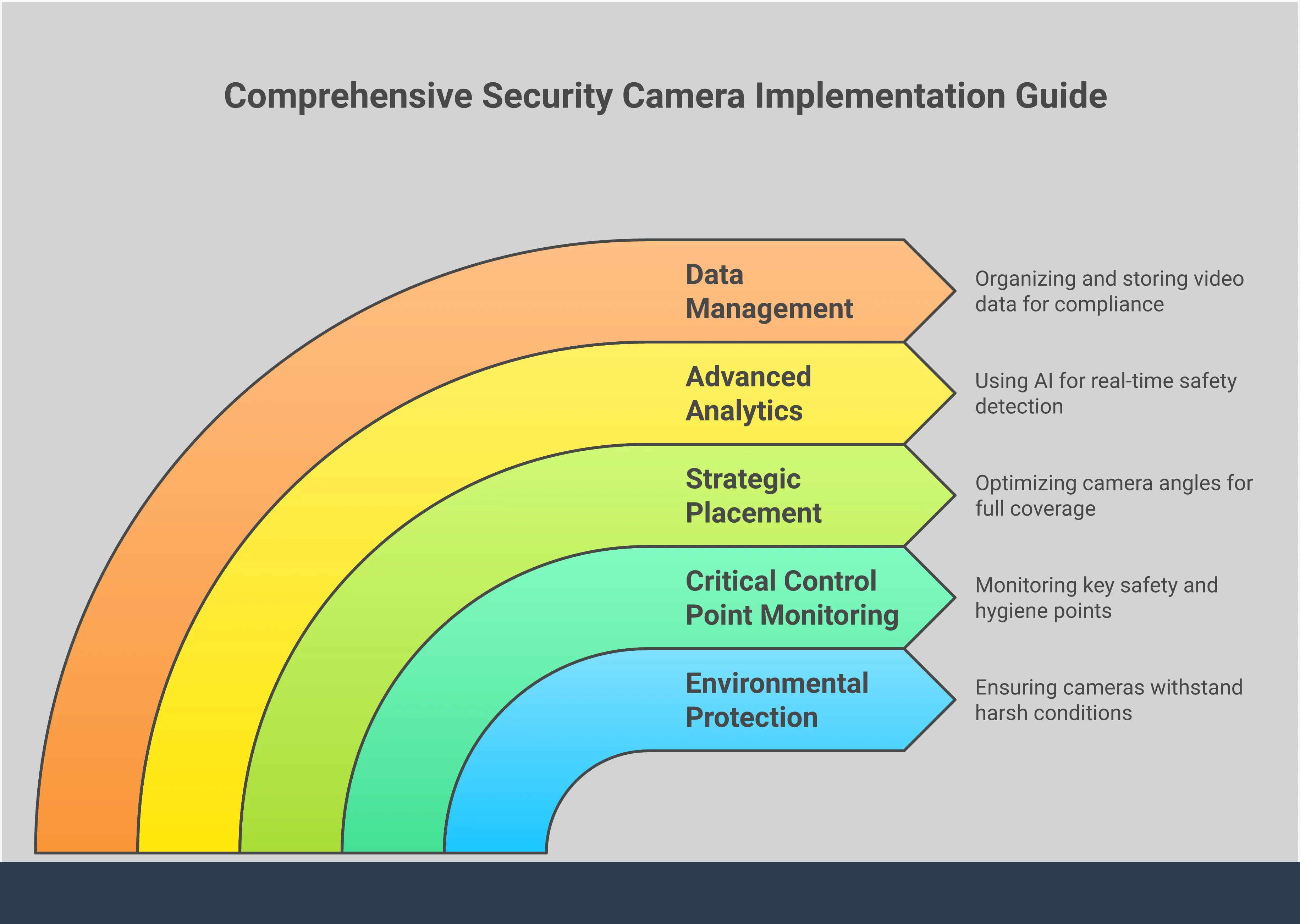
Food processing plants are tough on equipment, and your security cameras are no exception. They need to withstand daily high-pressure, high-temperature washdowns, constant humidity, and potential impacts. Look for cameras with high IP (Ingress Protection) ratings, like IP67 or higher, which certify they are sealed against dust and water. These specialized cameras are built to give you clear and dependable video, even in the most demanding conditions. A durable, sealed housing ensures that moisture and cleaning agents won’t compromise the internal electronics, giving you a reliable system that lasts.
Prioritize High-Quality Imaging, Day or Night
What good is a security camera if you can’t make out the details in the footage? In a food processing plant, clear imaging is non-negotiable for quality control and safety monitoring. You need high-resolution video (think 1080p or 4K) to see fine details on the production line. Since many facilities operate around the clock or have poorly lit areas like storage rooms and freezers, low-light performance is critical. Cameras with strong infrared (IR) capabilities are essential for capturing crisp, clear images in complete darkness, ensuring you have 24/7 visibility into every corner of your operation.
Demand Temperature and Chemical Resistance
Your facility likely has areas with extreme temperature swings, from hot ovens and cookers to walk-in freezers. On top of that, daily sanitation involves harsh, corrosive cleaning chemicals. Your cameras must be able to handle it all without failing. Look for specialized cameras with rugged housings made from materials like AISI 316L stainless steel. This material is specifically designed to withstand corrosive agents and wide temperature ranges. Investing in these purpose-built cameras prevents premature failure and ensures your surveillance system remains operational in the harshest parts of your food production environment.
Find FDA and USDA Compliant Features
Food processing plants operate under strict FDA, USDA, and FSMA regulations, and your security system should help you meet those standards, not hinder you. Look for cameras with designs that support sanitation, such as smooth, non-porous housings without crevices where bacteria can grow. The right system can also be a powerful compliance tool. For example, integrating your cameras with an access control system helps you enforce and document restricted entry to sensitive zones, which is a key requirement for many food safety plans and audits.
Get Real-Time Monitoring Capabilities
Being able to react to an issue the moment it happens is crucial for preventing contamination or safety incidents. A modern surveillance system should offer robust real-time monitoring from a central station or even a mobile device. This allows your quality assurance and security teams to watch processes as they happen and intervene immediately if something goes wrong. Beyond immediate response, this footage serves as invaluable proof of compliance during audits and inspections. It provides a clear, time-stamped record demonstrating that your facility consistently maintains the highest standards for safety and quality.
Understand IR and Wide Dynamic Range
Lighting conditions in a food processing plant can be tricky. You might have dark storage areas right next to brightly lit production lines, or loading docks where bright sunlight creates intense glare and deep shadows. This is where technical features like Infrared (IR) and Wide Dynamic Range (WDR) become essential. IR illuminators allow cameras to see clearly in total darkness, while WDR technology balances the light in a scene to capture details in both the brightest and darkest areas simultaneously. Understanding these features helps you select the right camera for each specific location, ensuring you always get a usable image.
Strategically Place and Implement Your Cameras
Choosing the right cameras is only half the battle. To truly get the most out of your investment, you need a thoughtful plan for where to place them. The goal isn’t just to record what happens, but to gain a clear, comprehensive view of your entire operation, from the moment raw materials arrive to the second finished products ship out. A strategic layout for your security camera systems helps you monitor critical processes, secure vulnerable areas, and create an indisputable record for compliance and quality control.
Think of your facility as a series of zones, each with its own unique risks and requirements. Production lines need close monitoring for safety and procedural adherence, while loading docks are prime spots for theft or contamination. By mapping out these key areas and understanding the specific challenges of each one—like steam in a cooking area or low light in a storage freezer—you can create a surveillance network that works for you. This proactive approach ensures you have eyes exactly where you need them, turning your camera system from a passive recorder into an active tool for improving safety, efficiency, and compliance.
Monitor Production Lines
Your production line is the heart of your operation, and it’s where many safety and quality control issues can arise. Placing cameras here gives you a direct view of your processes in action. This allows you to spot potential hazards like cross-contamination, verify that employees are following proper handling procedures, and ensure equipment is functioning correctly. Video footage provides an objective record that can be invaluable for troubleshooting production issues or reviewing safety incidents. It’s a powerful tool for maintaining high standards and demonstrating your commitment to quality and compliance during audits.
Secure Storage and Loading Areas
Storage rooms and loading docks are high-traffic, high-risk areas. They are vulnerable to everything from theft and pest intrusion to accidental contamination. Installing cameras in these locations helps you track the entire lifecycle of your inventory, from receiving raw materials to shipping out finished goods. This visual oversight deters unauthorized access and provides clear documentation of who handled what, and when. By pairing surveillance with access control systems, you can create a secure environment that protects your products, your property, and your people from start to finish.
Cover Critical Control Points
Under a Hazard Analysis and Critical Control Points (HACCP) plan, certain steps in your process are identified as critical for preventing food safety hazards. These Critical Control Points (CCPs)—like cooking, cooling, or packaging—require strict monitoring. Placing cameras at these specific points offers visual proof that your team is consistently meeting safety standards, such as checking temperatures or following sanitation protocols. This footage becomes a key part of your compliance documentation, offering undeniable evidence to auditors that you are maintaining the highest standards of food safety and diligence in your facility.
Account for Environmental Factors
Food processing facilities are tough on electronics. Steam, high-pressure washdowns, fluctuating temperatures, and dust can easily damage standard cameras. When planning your layout, you must account for these environmental conditions. For wet or steamy areas, you’ll need cameras with high IP ratings for water and dust resistance. In refrigerated or freezer storage, look for models designed to operate in extreme cold. For areas with poor lighting, cameras with strong low-light performance or infrared (IR) capabilities are essential to capture clear, usable footage around the clock.
Integrate with Access Control
Video surveillance becomes even more powerful when it works in tandem with your access control system. Integration allows you to link video footage directly to access events. For example, if someone uses a keycard to enter a restricted area, the system can automatically pull up the video feed from the nearest camera. This provides immediate visual verification, ensuring the person entering is who they say they are. This layered approach strengthens your security, helps you enforce access policies, and makes it much easier to investigate any incidents that may occur.
Plan Your Network Infrastructure
High-definition video cameras generate a massive amount of data. Your network needs to be ready to handle it without slowing down your other business-critical operations. Before installation, it’s crucial to assess your current network capacity and plan for the increased load. This may involve upgrading your existing setup or implementing dedicated fiber network technology solutions to ensure smooth, reliable video transmission. You also need a solid plan for data storage, whether on-site or in the cloud, to ensure you can retain footage for as long as regulations require.
Solve Common Implementation Challenges
Putting a new security camera system in place is more than just mounting hardware on the walls. In a food processing environment, you’ll face a unique set of hurdles, from tough physical conditions to complex regulations. Thinking through these challenges ahead of time will save you headaches down the road and ensure your system does exactly what you need it to do. A well-planned implementation is the key to a security solution that truly supports your operations.
Meet Complex Compliance Standards
Food processing is one of the most heavily regulated industries, and for good reason. You’re juggling standards from the FDA, USDA, and FSMA, and non-compliance can have serious consequences. Your surveillance system can be a powerful ally here. High-quality video footage serves as an impartial, time-stamped record, demonstrating that your team is following safety protocols and procedures. During an audit or inspection, this footage provides clear proof of your commitment to high standards. When paired with access control systems, you can also verify that only authorized personnel are entering sensitive areas like production floors, creating a comprehensive audit trail.
Manage Harsh Environmental Conditions
Your facility is likely a challenging place for electronics. Constant temperature fluctuations, steam, high-pressure washdowns, and corrosive cleaning agents can quickly destroy standard cameras. It’s critical to choose hardware specifically designed for these environments. Look for cameras with high IP (Ingress Protection) ratings that certify them as waterproof and dustproof. For areas with chemical exposure or extreme sanitation requirements, specialized cameras made from materials like stainless steel (such as AISI 316L) are built to withstand harsh conditions without rusting or degrading. Investing in the right durable security camera systems from the start prevents costly replacements and ensures reliable coverage.
Plan for Data Storage and Management
High-definition video from multiple cameras generates a massive amount of data. Before you install a single camera, you need a clear plan for how you’ll store and manage all that footage. Will you use on-premise servers or a cloud-based solution? How long do you need to retain recordings to meet regulatory requirements? A robust network is essential for handling this data flow without slowing down your other business operations. Planning your fiber network technology solutions and storage capacity upfront ensures your system is scalable and that you can always access critical footage when you need it for an audit or incident investigation.
Integrate Systems Seamlessly
Your security cameras are most effective when they work as part of a larger, cohesive system. Instead of operating in a silo, your video surveillance should communicate with your other security and operational tools. For example, integrating cameras with your access control system allows you to visually verify every door entry. Connecting them to air, light, and sound detection sensors can trigger recordings or alerts based on environmental changes. This creates a comprehensive security ecosystem where different components work together, providing deeper insights and a more complete picture of what’s happening in your facility at all times.
Address Employee Privacy
Introducing cameras into the workplace requires a thoughtful approach to employee privacy. It’s important to be transparent with your team about the purpose of the surveillance system—to ensure safety, maintain quality control, and protect the facility. Focus camera placement on production lines, entry and exit points, storage areas, and other critical control points rather than in break rooms or other private spaces. Clearly communicate your policies regarding video surveillance in your employee handbook. By framing the system as a tool for safety and operational excellence, you can build trust and ensure your team understands the cameras are there to support them, not to micromanage them.
Prepare for Ongoing Maintenance
Installation is just the first step. To get a long-term return on your investment, you need a plan for ongoing maintenance. In a food processing plant, camera lenses can easily become obscured by dust, steam, or other residues, compromising image quality. Regular cleaning is a must. You should also schedule periodic system check-ups to test connections, verify recording functionality, and install any necessary software updates. A proactive maintenance schedule ensures your system remains reliable and effective, catching potential issues like cross-contamination or compliance breaches without interruption. This keeps your system in top shape and ready to perform when you need it most.
Use Video Surveillance to Maximize Food Safety
In a food processing facility, your security cameras do more than just deter theft; they are a fundamental tool for operational integrity and public health. A well-designed video surveillance system provides the visual evidence you need to enforce safety protocols, streamline quality control, and maintain regulatory compliance. Think of your cameras as your most vigilant team members, working around the clock to help you identify potential hazards before they become serious problems.
From monitoring employee adherence to hygiene standards to documenting your production process for audits, video surveillance offers a layer of accountability that is difficult to achieve otherwise. It allows you to see exactly how your standard operating procedures are being implemented on the floor, providing valuable insights for training and process improvement. By leveraging this technology, you can actively protect your products, your employees, and your brand’s reputation from the significant risks associated with foodborne illness and contamination. It’s an investment in safety that pays dividends in quality, compliance, and customer trust.
Prevent Contamination
One of the most critical roles of video surveillance in a food facility is catching potential contamination hazards in real time. Cameras placed over production lines, hand-washing stations, and sanitation areas can help you spot issues like improper handling, cross-contamination between raw and cooked products, or breaches in hygiene protocols. This constant visual oversight makes it easier to enforce your facility’s rules and correct unsafe behaviors immediately.
For example, footage can confirm that employees are following proper gowning procedures or that equipment is being cleaned according to schedule. This proactive monitoring helps you catch small mistakes before they lead to a widespread contamination event, protecting both your product and the public.
Monitor for HACCP Compliance
Your Hazard Analysis and Critical Control Points (HACCP) plan is the backbone of your food safety program, and video surveillance is an excellent tool for supporting it. Cameras installed at your designated critical control points provide a visual record that your safety procedures are being followed consistently. This footage can be invaluable during audits and inspections.
Instead of relying solely on paper logs, you can use video evidence to demonstrate your commitment to maintaining high standards. Surveillance footage serves as objective proof that your team is monitoring temperatures, preventing cross-contamination, and adhering to every step of your HACCP plan. This documentation strengthens your compliance position and shows regulators you are serious about safety.
Verify Your Processes
You’ve spent time developing detailed standard operating procedures (SOPs), but how do you know they’re being followed correctly every single shift? Video surveillance allows you to verify that your documented processes are being put into practice on the facility floor. You can review footage to ensure tasks are performed consistently and according to your established quality and safety standards.
This is also crucial for verifying compliance with workplace safety regulations, such as those from the Occupational Safety and Health Administration (OSHA). By monitoring for proper equipment use and safe handling practices, you can protect your employees from injury while ensuring your operational workflows are being executed as designed.
Document for Quality Assurance
High-quality video footage creates a comprehensive and impartial audit trail of your entire production process. This visual documentation is a powerful asset for your quality assurance team. If a batch fails a quality check or a customer reports an issue, you can review the corresponding video to conduct a thorough root cause analysis.
This allows you to pinpoint exactly where and when a problem occurred, whether it was due to equipment malfunction, human error, or a flaw in the process. This detailed record-keeping not only helps you resolve issues quickly but also aids in demonstrating due diligence and adherence to safety protocols, protecting your business from liability.
Stop Cross-Contamination
Cross-contamination is a persistent threat in any food processing environment. Strategically placed cameras are essential for monitoring the movement of people, products, and equipment between different sanitation zones. You can use video to ensure that employees are not moving from raw material areas to ready-to-eat zones without following proper sanitation procedures.
Likewise, you can verify that color-coded tools and equipment are being used exclusively in their designated areas to prevent the transfer of allergens or pathogens. This visual oversight helps you enforce the strict separation required to maintain food safety standards, from the moment raw ingredients enter your facility to when the final product is packaged and shipped.
Set Up and Manage Your System
Installing your security cameras is a critical first step, but the real work begins once they’re up and running. A well-managed system is more than just a set of cameras; it’s an active tool for maintaining safety, compliance, and operational excellence. Creating clear procedures for your team ensures everyone understands their role in facility security. From initial training to ongoing maintenance and documentation, a structured approach turns your surveillance investment into a powerful asset for your food processing facility. By establishing these protocols, you build a resilient security framework that protects your products, people, and reputation.
Follow Installation Best Practices
Proper installation is the foundation of an effective surveillance system. Working with professionals ensures your security camera systems are positioned for optimal coverage, eliminating blind spots in critical areas like production lines and loading docks. A strategic setup also verifies that your facility meets all necessary standards, including local safety regulations and federal laws. The goal is to create a seamless monitoring environment that captures clear, usable footage without interfering with daily operations. Correct installation from the start saves you from costly adjustments and compliance headaches down the road.
Train Your Staff
Your security technology is only as effective as the people who use it. Comprehensive staff training is essential for maximizing the value of your video surveillance system. Your team should know how to operate the software, monitor live feeds, and retrieve footage when needed. More importantly, they need to understand what to look for, such as potential cross-contamination, compliance breaches, or deviations from standard operating procedures. Proper training empowers your employees to be proactive about safety and quality control, fostering a culture of accountability and shared responsibility throughout the facility.
Develop Security Protocols
Clear, documented protocols are necessary for managing your surveillance system consistently and legally. These guidelines should outline who has permission to view live and recorded footage, how long data is stored, and the exact steps to take when an incident is identified. Your protocols should also cover visitor access and behavior within the facility, ensuring everyone on-site adheres to your safety policies. Integrating these rules with your access control systems creates a unified security posture, making it easier to manage and monitor every entry point and sensitive area.
Schedule Maintenance and Updates
To rely on your surveillance system, you have to keep it in top condition. Regular maintenance prevents unexpected failures and ensures your cameras are always ready to perform. Schedule routine checks to clean lenses, confirm camera angles haven’t shifted, and test recording functions. It’s also vital to keep your system’s software and firmware updated to protect against cybersecurity threats and access new features. Well-maintained surveillance footage can serve as indisputable proof of compliance during audits and inspections, demonstrating that your facility consistently upholds the highest standards.
Create Cleaning and Sanitization Protocols
In a food processing environment, even your security equipment must meet strict hygiene standards. Develop specific cleaning and sanitization protocols for your cameras and housings that prevent contamination without damaging the hardware. This means using approved cleaning agents and methods suitable for sensitive electronics. When selecting cameras, choose models with enclosures rated for high-pressure washdowns. If cameras are used for nighttime surveillance or during cleaning cycles when lights are low, ensure they have strong low-light performance or infrared capabilities to maintain visibility.
Maintain Compliance Documentation
Thorough documentation is your best defense in an audit and a cornerstone of a good compliance strategy. Keep detailed records of everything related to your security system, including installation reports, maintenance logs, staff training sessions, and any incidents that occur. Your video footage is a key part of this documentation, creating a comprehensive and impartial audit trail. This organized approach helps you demonstrate compliance with regulatory standards like HACCP and FSMA, proving your commitment to food safety and protecting your business from potential liabilities.
Explore Advanced Features and Technologies
Choosing the right security cameras is just the beginning. The real power of a modern surveillance system lies in the technology that supports it. Today’s systems are more than just a set of eyes; they are intelligent tools that can provide deep insights into your operations, streamline compliance, and actively prevent incidents before they happen. By looking beyond the camera lens and considering the entire technological ecosystem, you can build a solution that not only secures your facility but also contributes to your bottom line.
As you design your system, think about how advanced features can solve your specific challenges. Do you need to automate compliance checks? Are you looking for easier ways to manage and review footage? Do you want a single, unified platform to manage all aspects of your facility’s security? Exploring features like artificial intelligence, cloud storage, and system integration will help you build a robust, scalable, and forward-thinking security plan that grows with your business and adapts to changing regulatory landscapes.
Leverage AI-Powered Analytics
Gone are the days of passively recording footage. Modern security camera systems use artificial intelligence (AI) to actively analyze video in real time. AI-powered analytics can automatically detect specific events, objects, or behaviors, turning your cameras into proactive security assets. For a food processing facility, this could mean instantly identifying a spill on the production floor, alerting a manager when an employee isn’t wearing the proper personal protective equipment (PPE), or flagging unusual activity in a storage area after hours. This technology helps you catch potential compliance or safety issues as they happen, not after the fact.
Consider Cloud Storage Solutions
How and where you store your video footage is just as important as how you capture it. While on-premise recorders are still common, cloud storage offers significant advantages in security, accessibility, and reliability. Storing your surveillance footage in the cloud ensures it’s safely backed up and protected from physical damage, theft, or tampering at your facility. It also allows for secure, easy access to video clips from anywhere, which is invaluable during audits or inspections. You can quickly pull and share specific footage to demonstrate compliance without having to sift through hours of recordings on a local device.
Enable Remote Monitoring
As a facility manager or business owner, you can’t be everywhere at once. Remote monitoring capabilities give you the power to oversee your operations from any location with an internet connection. Whether you’re at home, traveling, or in a different part of the building, you can view live video feeds from your computer or smartphone. This continuous oversight is critical for addressing safety issues or compliance breaches in real time. If a problem arises on the night shift, you can immediately assess the situation and guide your team, ensuring that protocols are followed and issues are resolved quickly and effectively.
Integrate with Other Security Systems
Your video surveillance system shouldn’t operate in a silo. For maximum effectiveness, it should be integrated with your other security platforms. Combining your cameras with an access control system, for example, allows you to visually verify every entry event. If an unauthorized keycard is used at a sensitive area, the system can automatically trigger the nearest camera to record and send an alert to your security team. This creates a more comprehensive security net, where different systems work together to protect your assets, enforce safety protocols, and create a detailed record of all activity.
Future-Proof Your Investment
Technology evolves quickly, and the security system you install today should be ready for the challenges of tomorrow. Future-proofing your investment means choosing scalable solutions that can adapt to your growing business and changing regulations. Opt for systems built on open platforms that allow for software updates and the integration of new technologies as they become available. Working with an expert to plan your network infrastructure security is also key. A forward-thinking approach ensures your system remains effective and compliant for years to come, providing a greater return on your investment.
Related Articles
- Food Process Manufacturing Security & Surveillance | UmbrellaTech
- Business CCTV Systems: The Ultimate Guide – Umbrella Security Systems
- Warehouse Video Surveillance: A Complete Guide – Umbrella Security Systems
- Best Panoramic Surveillance Cameras for Commercial
Frequently Asked Questions
Do I really need special, expensive cameras for my facility? Yes, you absolutely do. A standard office camera would likely fail within weeks in a food processing environment. Think about the daily high-pressure, high-temperature washdowns, the constant steam, and the corrosive cleaning chemicals. You need cameras with high IP ratings (like IP67) and stainless steel housings that are specifically built to survive those conditions. Investing in the right hardware from the start saves you from the cost and hassle of constant replacements and ensures you have reliable video when you need it most.
How can I use video footage to actually prove compliance during an audit? Video footage is your impartial, time-stamped proof that your team is following the rules. When an auditor asks how you monitor a Critical Control Point, you can do more than just show them a paper log. You can pull up video that shows your team performing the required temperature check or following a specific sanitation protocol at the exact time it was logged. This visual evidence is incredibly powerful and demonstrates a clear commitment to your safety plan.
My employees are worried about being watched. How do I address their privacy concerns? This is a common and completely valid concern. The key is transparency. Be upfront with your team about why the cameras are being installed—to ensure safety, improve quality control, and protect the facility. Frame it as a tool to support their work, not to micromanage them. Make it clear that cameras will be placed in operational areas like production lines, loading docks, and entryways, and will not be installed in private areas like break rooms or locker rooms.
Besides security, what’s the biggest operational benefit of having these cameras? One of the biggest benefits is having an objective tool for training and process improvement. Instead of just telling a new hire how to perform a task, you can show them a clear video of it being done correctly. If a quality issue arises on a production line, you can review the footage with your team to pinpoint exactly what went wrong without placing blame. It creates a visual record that helps everyone learn and maintain high standards.
What’s more important: the camera itself or where I place it? That’s like asking if the engine or the wheels are more important on a car—you need both to work together perfectly. A high-end, durable camera won’t do you any good if it’s pointed at the wrong spot and has a massive blind spot on your production line. Likewise, a perfectly placed camera is useless if it can’t handle the steam and condensation in the room and produces a blurry image. A successful system depends on selecting the right camera for each specific environment and installing it in a strategic location to give you the view you need.