


How Access Control Systems Are Installed: A Business Planning Guide
This updated blog post explains how business access control projects are planned, installed, tested, and supported without confusing the planning guide with Umbrella’s dedicated installation service page.
Installing access control is not just putting card readers on doors. A business access control project touches door hardware, low-voltage wiring, power, credentials, software, user permissions, fire/life-safety behavior, admin training, cybersecurity, and long-term support.
This guide explains how access control systems are installed so business owners, facility leaders, IT managers, security directors, and operations teams can make smarter decisions before approving a project.
Understanding how access control systems are installed helps business leaders avoid buying hardware before defining the workflow.
For organizations ready to move from planning to implementation, Umbrella’s service page covers access control installation in Chicago and Northern Illinois.
Quick Takeaways Before You Start an Access Control Project
A strong installation starts with the way your business actually operates: who enters, when they enter, which doors matter, what happens during emergencies, and who manages access after the system goes live.
When teams understand how access control systems are installed, they ask better questions about wiring, power, egress, software, and long-term support.
The door matters as much as the software.
The right access control platform can still fail if the door, frame, lock, power, or exit hardware is wrong.
Credentials should follow roles, not personalities.
Role-based access is easier to manage than custom permissions for every individual employee.
Testing is where weak designs show up.
Every reader, lock, REX device, door contact, credential, schedule, and event log should be tested.
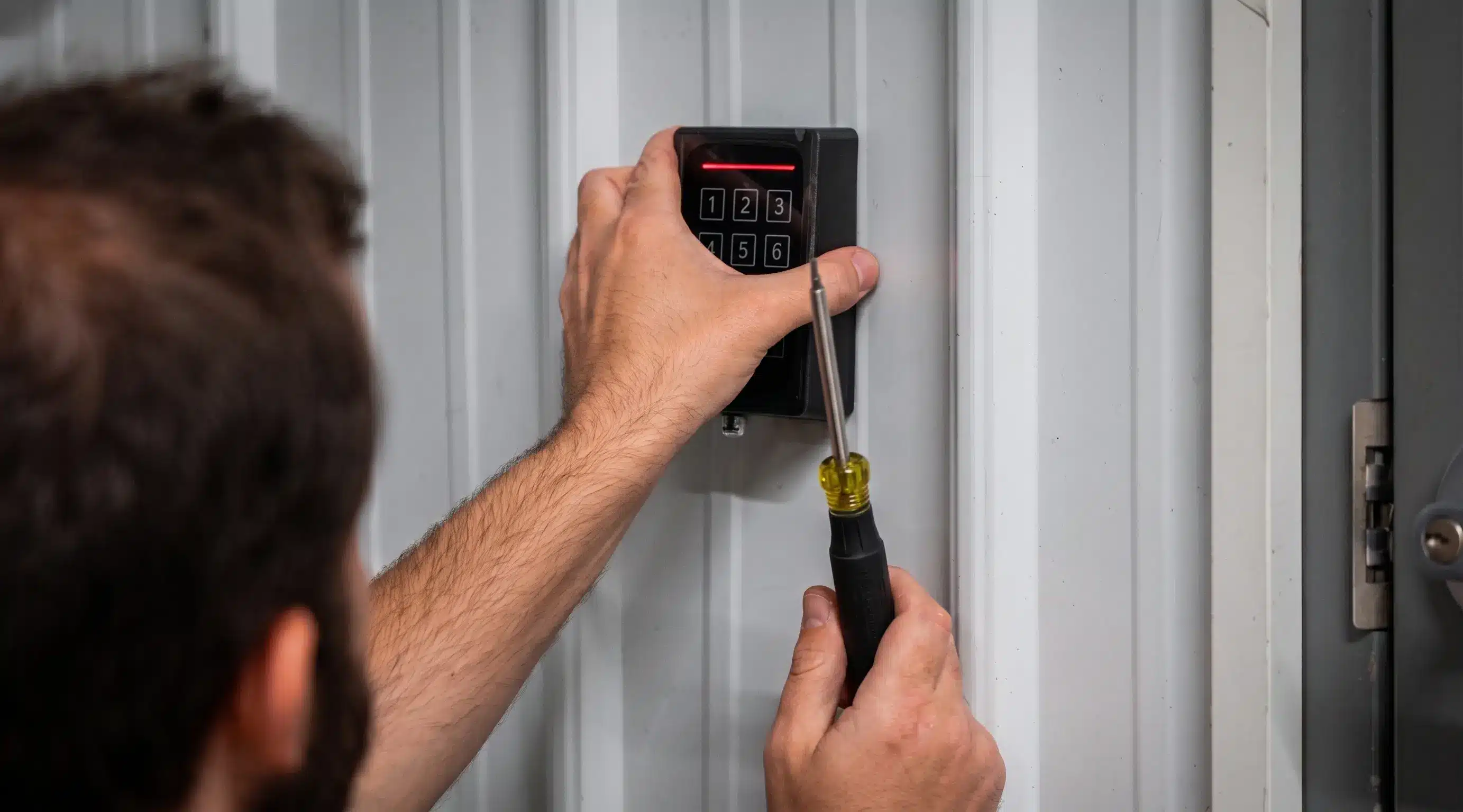
Watch the Field Work: Prox Reader Installation B-Roll
This 30-second B-roll shows Umbrella technicians installing a prox card reader. The video is injected after page load so Divi is less likely to strip the video element.
Open the installation video
What This Guide Covers — and When to Use the Service Page
This updated blog post is a planning guide. It is designed to help your team understand the installation process, ask better questions, and avoid expensive mistakes before a project is scoped.
Use this guide if you are researching:
- How access control systems are installed
- What hardware and software components are involved
- What happens before, during, and after installation
- How door hardware affects the project
- What wiring, power, and network planning should include
- What mistakes cause access control projects to fail
Use the service page if you are ready for:
- New installation
- System replacement
- Door additions
- Multi-site rollout
- System upgrade
- Site assessment
- Project scoping
Next step: access control installation in Chicago and Northern Illinois.
Why Access Control Installation Gets More Complicated Than Buyers Expect
Access control looks simple from the outside. A person presents a card, fob, mobile credential, PIN, or biometric credential. The door unlocks. The event is logged. The administrator can add or remove users.
Behind that simple experience is a full system stack: readers, credentials, locks, controllers, power supplies, backup batteries, wiring, software, schedules, user roles, event logs, alerts, and integrations.
For a real-world manufacturer example, see our PDK access control installation experience.

What Is Included in an Access Control System?
A business access control system usually has five layers: the opening, locking hardware, reader and credential, controller and power infrastructure, and software administration model.
The Door, Frame, Gate, or Entry Point
Each opening needs to be reviewed independently because the hardware, traffic pattern, life-safety behavior, and security need may be different.
The Locking Method
Electric strikes, maglocks, electrified locksets, electrified panic hardware, wireless locks, gates, and elevators all behave differently.
The Reader and Credential
The reader verifies the credential, whether it is a card, fob, mobile credential, PIN, or biometric identifier.
Controllers, Power, and Wiring
Controllers process credential reads, check permissions, unlock doors, monitor inputs, and report events.
Software and Administration
Administrators add users, remove users, assign credentials, create schedules, run reports, and manage doors.
Training and Long-Term Support
The installation is not complete until the business can operate, troubleshoot, expand, and support the system.
How Access Control Systems Are Installed
This section explains how access control systems are installed from the first door review through final testing. The process varies depending on the building, system type, number of doors, platform, wiring conditions, door hardware, and integration needs.
The best way to understand how access control systems are installed is to map each door, user group, credential type, and emergency behavior before approving the scope.
Step 1 — Define Doors, Users, and Access Zones
The first step is deciding what the system should control. Do not start with product selection. Start with the building.
| Door Type | Planning Question |
|---|---|
| Main entrance | Who enters during business hours, after hours, and during emergencies? |
| Employee entrance | Should employees use cards, fobs, mobile credentials, or PINs? |
| Warehouse door | Does the door need tighter control because of inventory, tools, or deliveries? |
| Server room | Should access be limited to IT and logged separately? |
| Tenant door | Who manages access: building owner, tenant, or property manager? |
Avoid building access around individual personalities. Use roles such as employees, managers, IT staff, facilities, security, cleaning crews, contractors, tenants, visitors, vendors, and temporary workers.
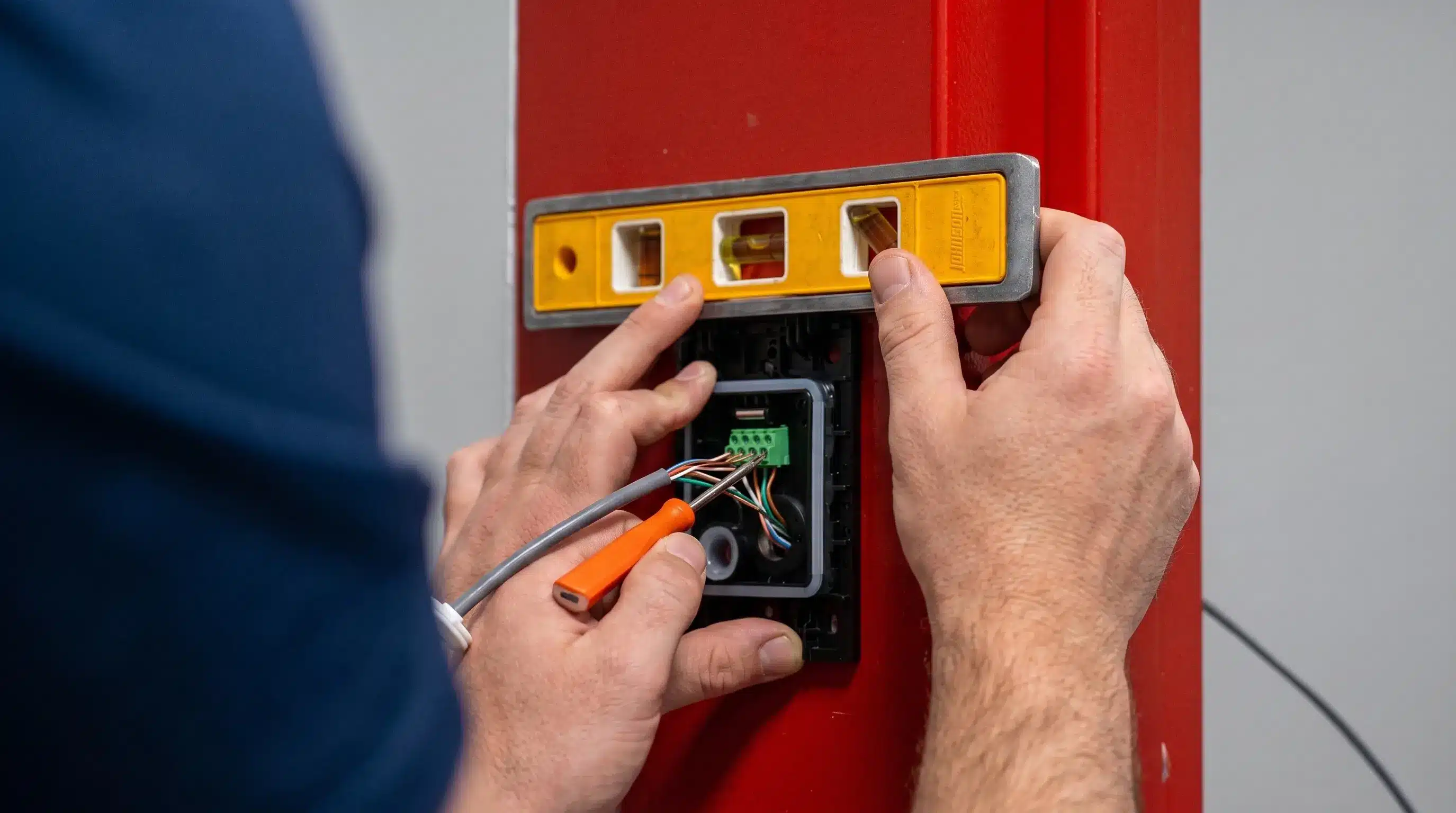
Step 2 — Review Door Hardware and Egress Requirements
This is the step many buyers underestimate. The access control platform may be modern, but the door still has to work physically and safely.
Review each opening
- Door material
- Frame type
- Existing lockset
- Existing exit device
- Fire rating
- Door swing
- Latch condition
- Closer condition
- Existing conduit or wire path
- Fail-safe or fail-secure behavior
Life-safety note
Controlled doors are not just security devices. They are life-safety openings. Egress, fire alarm interface, power behavior, and code requirements must be planned correctly.
Step 3 and 4 — Plan Wiring, Power, Controllers, Then Install Readers and Locks
Access control installation depends heavily on the building infrastructure. Before a project is approved, the team should understand what it will take to connect doors to the controller and management platform.

Wiring planning
- Reader cable path
- Lock power path
- Door contact cable
- REX device wiring
- Conduit needs
- Ceiling access
Power planning
- Lock power requirements
- Reader power requirements
- Controller power
- Battery backup
- Power supply sizing
- Surge protection
Network planning
- IP addressing
- VLAN needs
- Firewall rules
- Cloud connectivity
- MFA requirements
- Logging and monitoring
Step 5, 6, and 7 — Configure, Test, Train, and Support
Once hardware is installed and connected, the system must be configured, tested door by door, and handed off to trained administrators.
Configure the system
- Door names
- User groups
- Access levels
- Schedules
- Holiday schedules
- Credential enrollment
- Alerts and reports
Test every door
- Valid credential
- Invalid credential
- Expired credential
- Door held open
- Door forced
- REX behavior
- Event logs
Train administrators
- Add users
- Remove users
- Assign credentials
- Review logs
- Change schedules
- Handle lost cards
- Request support
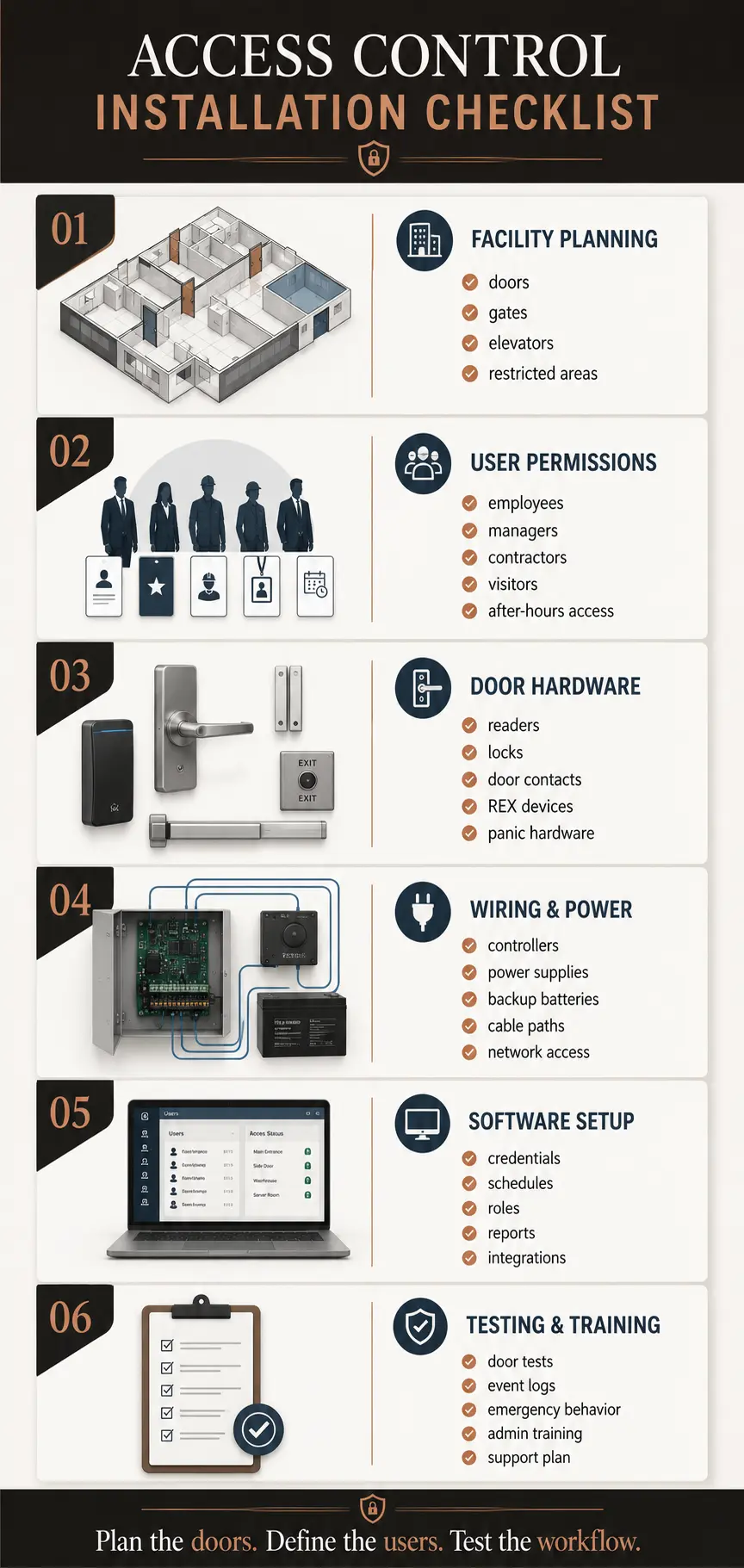
Access Control Installation Checklist for Businesses
Use this checklist before approving an access control project. It helps your team understand how access control systems are installed before product selection, pricing, and project scope are finalized.
Checklist categories
- Facility planning
- User and permission planning
- Door hardware planning
- Wiring and infrastructure planning
- Software planning
- Testing and go-live planning
Planning the doors, defining the users, and testing the workflow are more important than chasing the cheapest hardware quote.
Common Mistakes That Cause Access Control Projects to Fail
Starting with hardware instead of workflow
The better first question is: who needs access to which areas, under what conditions, and who manages that access later?
Ignoring door condition
A reader cannot fix a door that does not close. If the opening is weak, fix the opening before relying on electronic access control.
Choosing the wrong locking method
Electric strikes, maglocks, electrified locksets, and electrified panic hardware behave differently.
Underestimating wiring
Finished walls, block walls, fire-rated pathways, long cable runs, and limited conduit can change the project.
Building permissions one person at a time
Role-based access is easier to administer, audit, troubleshoot, and expand.
No support plan after go-live
People join, leave, lose cards, change roles, and need access updates. Support planning belongs in the original scope.
DIY vs. Professional Installation: What Business Owners Should Know
Some business owners ask whether they can install access control themselves. The honest answer is: sometimes, but the risk depends on the environment.
DIY may be reasonable for:
- A single interior office door
- A very small business
- A pre-configured kit
- Non-critical access points
- No fire/life-safety complexity
- No system integration
- No complex wiring
Professional installation is usually better for:
- Exterior doors
- Multi-door systems
- Warehouses
- Schools
- Healthcare
- Municipal buildings
- Gates and elevators
- Camera, intercom, or alarm integrations
Planning Questions to Answer Before Calling an Installer
Door questions
- Which doors need access control?
- Are the doors exterior or interior?
- Are any doors fire-rated?
- Do doors close and latch reliably?
- Are gates or elevators involved?
User questions
- How many users need access?
- What roles should exist?
- Who needs after-hours access?
- Who approves access changes?
- Who removes terminated users?
Technology questions
- Cards, fobs, mobile credentials, PINs, or biometrics?
- Cloud or on-premise management?
- Camera integration?
- Intercom integration?
- Lockdown behavior?
IT questions
- Who manages the network?
- Are firewall rules needed?
- Will MFA be required?
- Who owns software updates?
- Who owns backups?
Access Control System Components: What Each Part Does
| Component | What It Does | Planning Risk |
|---|---|---|
| Reader | Reads the user credential | Wrong reader can limit future credential options |
| Credential | Identifies the user | Weak credentials can create sharing or cloning risk |
| Controller | Makes access decisions | Poor placement or capacity planning can limit expansion |
| Electric strike | Releases the latch when access is approved | Must match lock, frame, and egress needs |
| Maglock | Uses magnetism to secure the door | Requires careful life-safety and release planning |
| Door contact | Reports whether the door is open or closed | Misalignment creates false alarms |
| REX device | Detects or enables request to exit | Poor configuration can create security or egress issues |
| Software | Manages users, schedules, doors, and events | Bad permissions design creates admin headaches |
Cloud, On-Premise, Cameras, Intercoms, and Other Integration Decisions
Installation decisions are affected by system architecture. A cloud-managed access control system may reduce server burden and simplify remote administration. An on-premise system may fit organizations with internal IT control, specific compliance requirements, or legacy infrastructure.
Platform selection affects more than the reader at the door. Review the Axis controller and platform considerations, then confirm the management software, licensing, supported readers, integrations and service responsibilities required for your project.
A Newsworthy Angle: Access Control Is Becoming an Operations Issue, Not Just a Security Upgrade
For press, trade publications, and local business outlets, the story is bigger than card readers. Businesses are not only replacing keys. They are trying to solve operational problems.
Why this topic is bigger than hardware
- Employee turnover
- Contractor access
- Hybrid work schedules
- Multi-site administration
- Warehouse accountability
- Healthcare and school safety concerns
- Visitor management
- IT/security convergence
- Faster credential revocation
- Audit readiness
The stronger story is not “Company installs access control.” The stronger story is that businesses are rethinking who gets access, when they get it, and how quickly access can be removed.
Frequently Asked Questions
What is access control system installation?
Access control system installation is the process of setting up the hardware, wiring, power, software, credentials, schedules, permissions, and testing required to control and monitor entry into a building or restricted area.
How are access control systems installed?
Access control systems are installed by first mapping doors, users, and access zones; reviewing door hardware and egress requirements; planning wiring, power, controllers, and network needs; installing readers and locking hardware; configuring software; testing every door; and training administrators.
What equipment is needed for access control installation?
Common equipment includes readers, credentials, controllers, electric strikes or maglocks, electrified locks, door contacts, request-to-exit devices, power supplies, backup batteries, wiring, network connections, and access control software.
Can a business install its own access control system?
Some small single-door systems may be suitable for DIY installation. Commercial, multi-door, exterior-door, regulated, integrated, or life-safety-sensitive projects usually require professional planning and installation.
What is the most common access control installation mistake?
The most common mistake is failing to plan the door, hardware, egress behavior, wiring path, permissions, and support model before buying equipment.
What is the difference between fail-safe and fail-secure access control?
Fail-safe means the door unlocks when power is lost. Fail-secure means the door remains locked from the outside when power is lost while still requiring safe egress from the inside where applicable. The right choice depends on the opening, code requirements, and security need.
Should access control integrate with security cameras?
Often, yes. Camera integration can help verify access events, forced doors, tailgating, visitor activity, and after-hours incidents.
When should a business call a professional installer?
A business should call a professional installer when the project involves multiple doors, exterior openings, fire-rated doors, maglocks, electric strikes, gates, elevators, system integrations, compliance-sensitive environments, or long-term support needs.
Use This Updated Guide to Plan. Use the Service Page to Act.
Access control installation is not just a hardware project. It is a business workflow, a security system, a door hardware project, a software configuration, a user-permission model, and a long-term support plan.
This updated blog post explains how access control systems are installed so your team can plan intelligently before committing to a platform, installer, or budget.
When your organization is ready for a scoped project, Umbrella Security can help with access control installation in Chicago and Northern Illinois, including site assessment, door review, system design, installation, commissioning, training, and long-term support.